
There's no single search box for everything on Rupeezy — stocks, indices, F&O contracts, and ETFs share one search (on the Watchlist screen), mutual funds have a separate search of their own (under Explore), and IPOs and Government Securities aren't searched by name at all — you browse them as a list.
Where do I search for stocks, indices, F&O contracts, and ETFs?
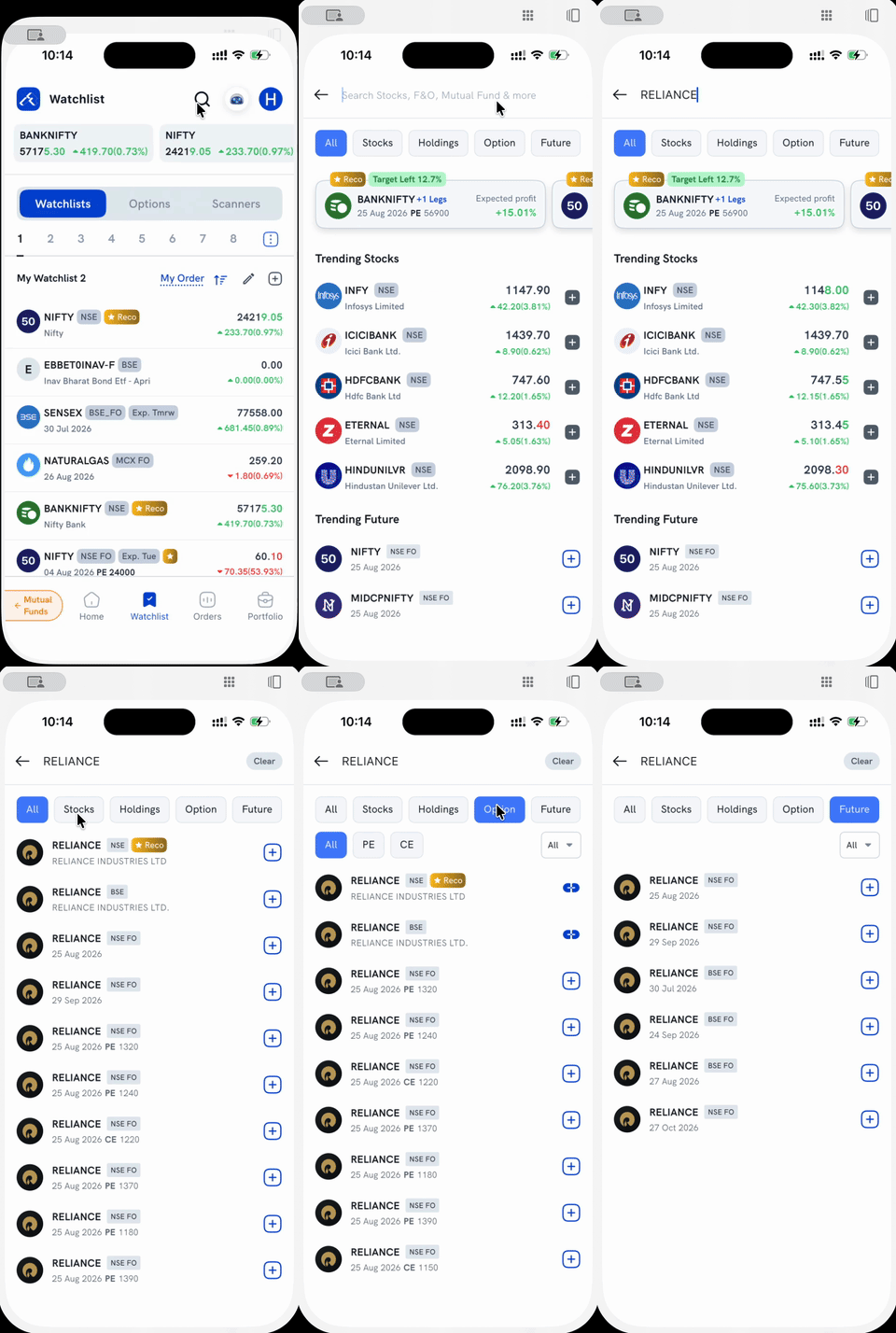
1. Tap the search icon at the top of the Watchlist screen (or the + next to "My Watchlist" — both open the same search screen).
2. Type a name — a stock (RELIANCE), an index (NIFTY, SENSEX), or an ETF. Results appear as you type, each row tagged by exchange/segment: NSE, BSE, NSE FO, BSE FO, or ETF.
3. Use the filter tabs — All, Stocks, Option, Future (and ETF, when relevant) — to narrow a long results list down to just one type. Under Stocks, results also include similarly-named companies, not just an exact match. Under Option, a cash-market stock or index row shows a chain-link icon instead of + — that opens its Option Chain rather than adding it directly.
From here, tapping + on a result adds it to your Watchlist — see How do I add instruments to my Watchlist? for that flow, including the F&O-specific details and adding indices. Tapping the result's row itself, instead of the +, opens its detail page to trade it.
Where do I search for mutual funds?
Mutual funds aren't in the Watchlist search — they have their own search under the Explore tab. Tap Explore, then the Search Mutual Funds bar at the top, and type a scheme or fund house name. See How to search for mutual funds on Rupeezy? for sorting, filtering, and what each result shows.
How do I find IPOs?
IPOs aren't searched by name — you browse the live and upcoming ones from the IPO Section on the Home screen. See How do I apply for an IPO? for the full application flow.
How do I find Government Securities and T-Bills?
Government Securities and T-Bills are also browsed rather than searched, and only on Rupeezy Web (Dock) — not the mobile app. Go to Bids, then the G-Sec tab, to see what's currently open. See How do I invest in G-Secs and T-Bills on Rupeezy? for the bidding flow.
Things to keep in mind
- Searching or browsing doesn't place an order by itself — it only finds the instrument. You still need to open it and choose to invest, add it to your Watchlist, or apply.
- Which screen you land on depends on the product: Watchlist search for stocks/indices/F&O/ETFs, Explore search for mutual funds, and dedicated sections for IPOs and G-Secs.