
Search the index by name from your Watchlist (NIFTY, BANKNIFTY, SENSEX, or any other) and tap + next to it, the same way you'd add a stock.
How to add an index to your Watchlist
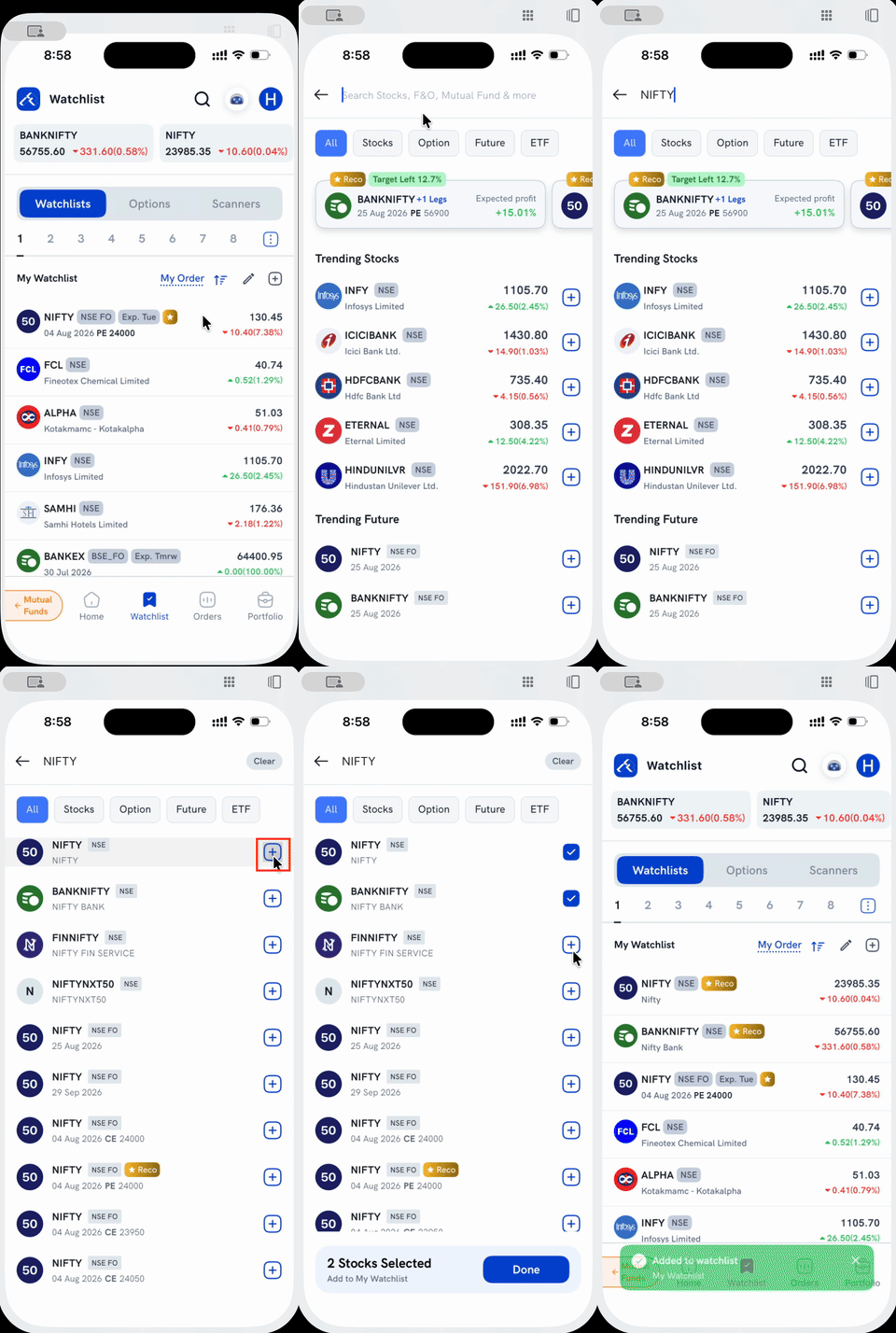
1. Tap the + icon next to "My Watchlist," or the search icon at the top of the Watchlist screen. Both open the same search.
2. Type the index's name, e.g. "NIFTY." The index itself shows up as a plain row tagged NSE (no F&O tag), separate from any futures or options contracts on it, which show further down the same results tagged NSE FO. Searching "NIFTY" also surfaces related indices like BANKNIFTY (Nifty Bank) and FINNIFTY in the same list, since their descriptions match.
3. Tap the + next to the index you want. It turns into a checkmark, and you can keep selecting more: search a second index (or scroll the current results) and tap its + too, all before adding anything.
4. Tap Done on the bar at the bottom. You're taken back to your Watchlist, a confirmation appears, and every index you selected now shows up in your list.
Things to keep in mind
- An index like NIFTY 50 can't be bought or sold directly. Adding it to your Watchlist just tracks its level. To trade the index, add one of its F&O contracts instead.