
On Rupeezy, the Option Chain shows every Call and Put strike for a stock or index side by side, with live OI% change, PCR, and LTP — open it from a stock's quick-action bar or the Watchlist's Options tab.
How do I open the Option Chain on the Rupeezy app?
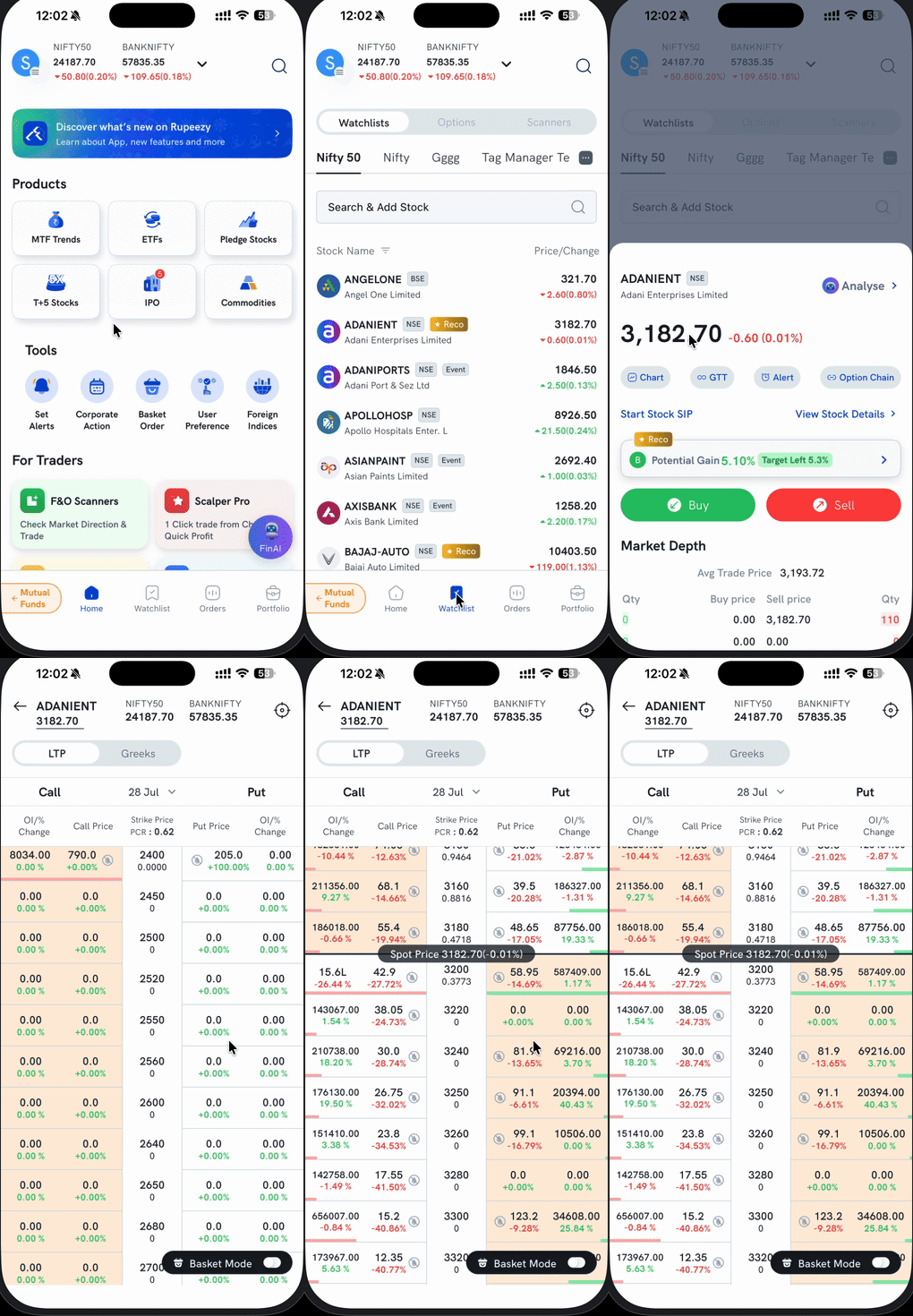
1. On Home, tap Watchlist in the bottom navigation bar. 2. Open the Watchlists tab (this is the default tab) and tap the stock you want, for example ADANIENT. 3. On the stock's quick-action sheet, tap Option Chain — next to Chart, GTT, and Alert. 4. The Option Chain screen opens for that stock, with strikes centered on the current spot price.
You can also reach an index's Option Chain directly: from the Watchlist screen, switch to the Options tab (Watchlists / Options / Scanners) and pick an index — Nifty, BankNifty, Sensex, FinNifty, and others — to see its chain without going through a stock first.
What does the Option Chain screen show?
- Call and Put columns — Call strikes and prices on the left, Put strikes and prices on the right, split by the Strike Price column in the middle.
- Expiry selector — the date next to "Call"/"Put" (e.g. 28 Jul) opens a dropdown to switch expiries.
- OI/% Change — open interest and its percentage change for each strike, shown on both the Call and Put side.
- PCR — the Put-Call Ratio for the selected expiry, shown next to the Strike Price header.
- Per-strike PCR — each row also shows a PCR for that specific strike, displayed below the Strike Price value, separate from the overall expiry PCR at the top.
- Spot Price marker — a horizontal bar pinned at the row closest to the current market price, so at-the-money strikes are easy to spot while scrolling.
- LTP / Greeks toggle — switch the Call/Put columns between Last Traded Price and Options Greeks (Delta, Gamma, Vega, Theta) for the same strikes.
- Basket Mode — a toggle at the bottom right; turn it on to tap strikes directly into a multi-leg basket instead of opening a single order form. See Basket Mode for the full add/edit/execute flow.
Things to keep in mind
- OI/% Change and PCR update through the trading session — values differ from what you see in this article.
- Switching to the Greeks view shows Delta, Gamma, Vega, and Theta for the same strikes you were already looking at in LTP view.
- The Watchlist's Options tab opens on whichever index you last viewed — switch it from the tab if you land on the wrong one.
- Option Chain opening blank? It's rendered through Android System WebView — see How do I update Android System WebView and my default browser?.