
You can pull the mutual funds you bought on other platforms into Rupeezy with Track External Fund, in the Mutual Funds section of the app. It fetches your holdings and their full transaction history from MF Central over a read-only, OTP-verified connection, so your entire portfolio sits in one place.
How do I import my external mutual funds?
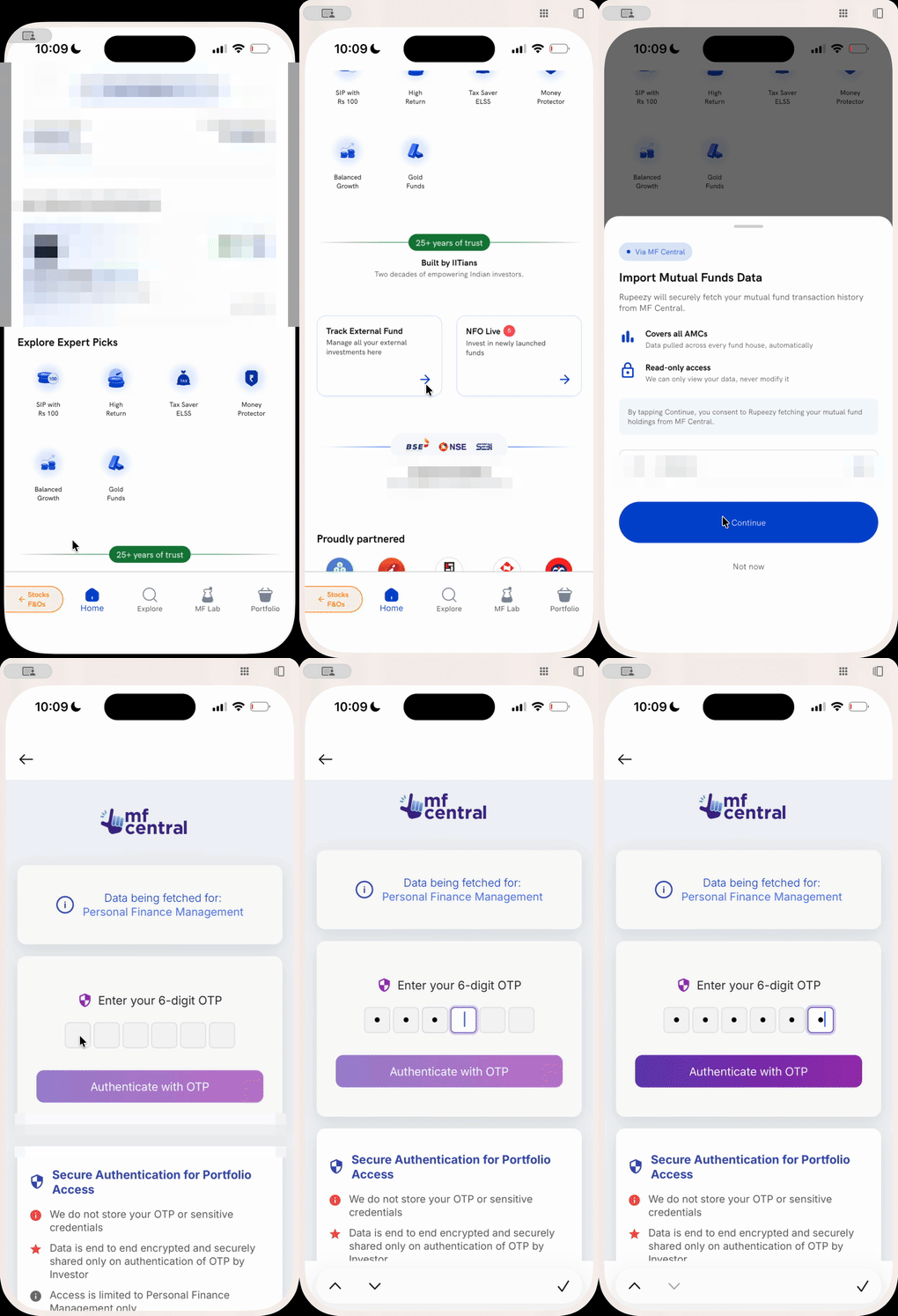
- Open the Rupeezy app and go to the Mutual Funds section.
- Scroll down the home screen and tap Track External Fund.
- On the Import Mutual Funds Data sheet, check that the mobile number shown is the one registered with your investments, and tap Continue.
- Enter the 6-digit OTP and tap Authenticate with OTP.
Once you authenticate, Rupeezy fetches your data from MF Central and your external schemes appear alongside the funds you already hold on Rupeezy.
What is MF Central, and what does Rupeezy pull in?
MF Central is the shared platform run by the two mutual fund registrars, CAMS and KFintech, that between them service every AMC in India. Because Rupeezy imports through it, the pull covers your funds across all fund houses, not just one — including schemes you bought years ago on other platforms.
The access is read-only. Rupeezy brings in your holdings and their transaction history so it can show and analyse them; it does not gain any power to transact on those external folios. The number you verify with the OTP has to be the mobile number registered against those investments, since that is how MF Central matches the records to you.
What can I do once my funds are imported?
Your imported schemes join your Rupeezy portfolio, so everything that works for funds you bought on Rupeezy now works across your whole holding:
- See them in your mutual fund portfolio, with current value, invested value and returns.
- Include them in your portfolio analysis.
- Have them counted in your mutual fund capital gains report, which then reflects your full portfolio rather than only what you transacted on Rupeezy.
Things to keep in mind
- Use the mobile number registered with your investments. MF Central matches your funds to that number, so an import from a different number will not find them.
- The connection is read-only. Importing lets Rupeezy show and analyse your external funds; it does not move them or let anyone transact on them.
- Import first, then run reports. A report or analysis pulled before you import will only show the funds you transacted on Rupeezy.