
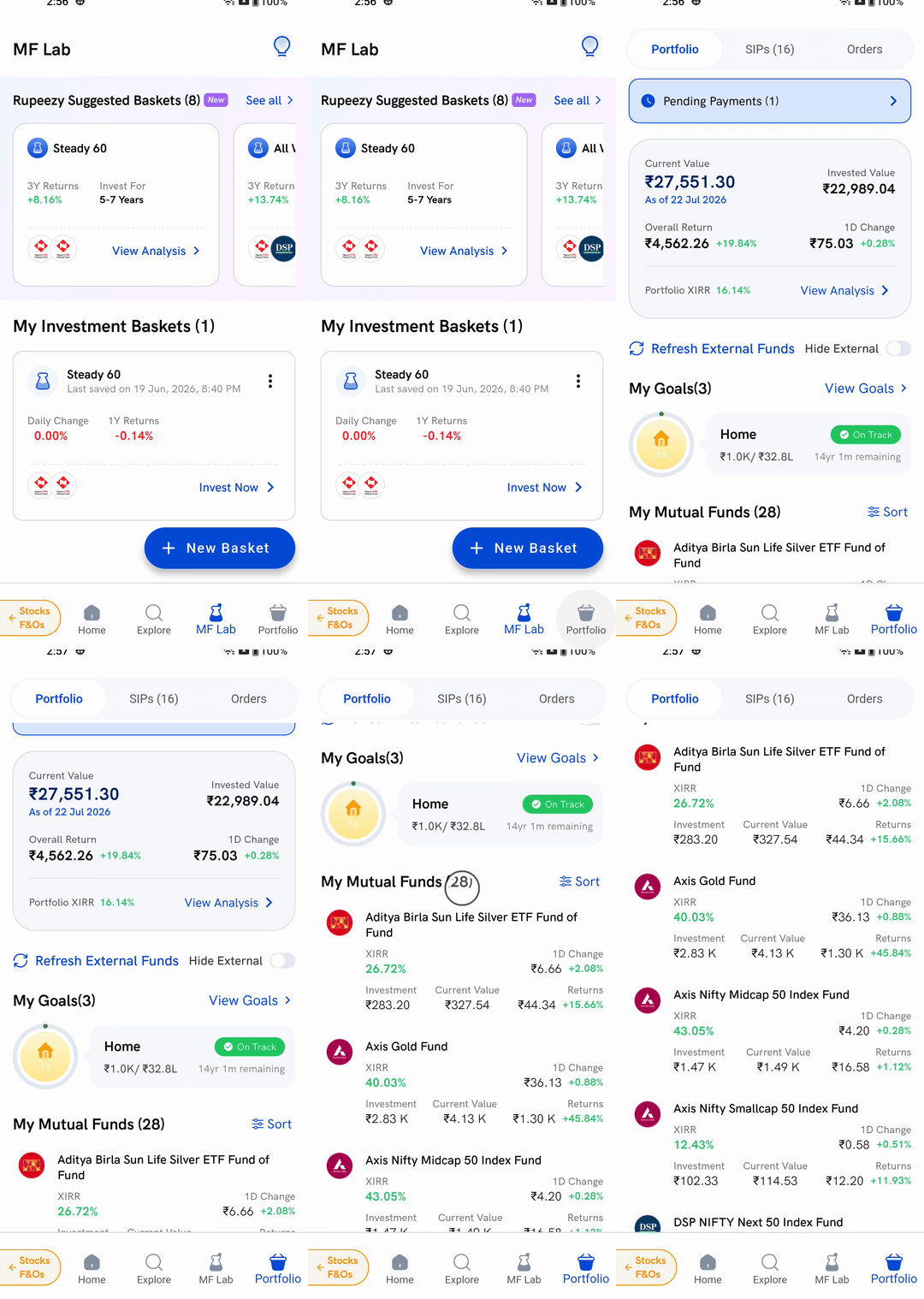
Tap Portfolio in the bottom bar of the Rupeezy app. The top of the screen shows what your whole mutual fund portfolio is worth today, and scrolling down brings you to My Mutual Funds, the list of every scheme you hold with its own value and returns.
How do I open my mutual fund investments?
1. Tap Portfolio — it is the last tab in the bottom bar, alongside Home, Explore and MF Lab. The bar stays on screen wherever you are in the mutual funds section, so you can reach it from any screen.
2. Check the toggle at the top — it opens on Portfolio. The other two positions, SIPs and Orders, show your running SIPs and your order history instead.
3. Read the value card — the summary of your whole portfolio sits directly below.
4. Scroll down to My Mutual Funds — the heading carries the number of schemes you hold, and each fund below it is a separate card.
What do the numbers at the top mean?
The value card covers your mutual fund portfolio as a whole:
- Current Value — what all your holdings are worth today, with the As of date the valuation was taken from
- Invested Value — the total you have put in
- Overall Return — the difference between the two, in rupees and as a percentage
- 1D Change — how much the portfolio moved since the previous valuation, in rupees and as a percentage
- Portfolio XIRR — your annualised return, which accounts for the fact that you invested different amounts on different dates
View Analysis at the bottom right of the card opens a separate screen that breaks the portfolio down further.
If you have money on the way into a scheme, a Pending Payments strip appears above the card with the number of payments still to be completed.
What does each fund row show?
Every card under My Mutual Funds carries six things for that one scheme:
- Fund name
- XIRR — the annualised return for that fund alone
- 1D Change — the day's movement, in rupees and as a percentage
- Investment — what you put into that fund
- Current Value — what it is worth today
- Returns — the gain or loss, in rupees and as a percentage
Tap any fund to open its folio-level details, where the units you hold and that fund's transaction history are listed.
You may notice the same figure is labelled slightly differently in different places — Invested Value on the portfolio card and Investment on a fund card both mean the amount you put in.
Can I change the order the funds appear in?
Yes. Tap Sort on the right of the My Mutual Funds heading. You can order the list by:
- Current Value
- Name
- Invested Amount
- Returns
- Returns %
- 1D Change
- 1D Change %
- XIRR
Name sorts A to Z or Z to A; every other option sorts High to Low or Low to High. Tap Apply to use your choice. Until you sort it yourself the list is ordered by Name, A to Z, and tapping Reset switches it to Current Value, highest first.
Rupeezy remembers your last choice, so the list stays in that order the next time you open the Portfolio tab.
What if the list is empty?
If you have not invested through Rupeezy yet, the list reads No Funds Found rather than showing schemes. The message underneath depends on where you are: it may ask you to finish your KYC or account opening first, or tell you that a recent order is still being allotted.
An order that has been placed but not yet allotted will not appear as a holding — until the units are allotted it sits under the Orders toggle, not in My Mutual Funds.
You can still track investments you made elsewhere. Tap Import External Funds to bring mutual funds you hold outside Rupeezy onto this screen.
What are the External and Hide External options?
Mutual funds you hold outside Rupeezy can be imported and tracked here alongside the ones you bought through us. Once imported:
- Imported funds carry an External tag on their card so you can tell them apart
- Refresh External Funds above the list pulls their latest values
- Hide External hides them, leaving only the funds you bought through Rupeezy
A fund you have asked to sell shows a Redemption In Progress tag until the redemption completes.
Things to keep in mind
- Values are not live prices. Mutual funds are valued once a day, which is why the card carries an As of date — the whole screen reflects that valuation, not the current market.
- XIRR and Returns answer different questions. Returns is the plain gain or loss on what you put in; XIRR turns that into an annual rate that accounts for when each instalment went in. For a SIP the two will rarely match.
- If a My Goals section appears above the list, it shows the goals you have set up and how each is tracking.
- Tapping a fund opens its details but does not place or cancel anything. A fund's detail screen carries Redeem/SWP and Invest Now buttons, but nothing happens until you go through those flows.