
If your bank has changed your account number, or your branch's IFSC after a merger or relocation, update it from Dock's Profile → Bank section — the same place you'd switch to a different bank account entirely. You only re-enter the account number and IFSC code; Rupeezy doesn't collect a separate MICR code.
How do I update my bank account details on Dock?
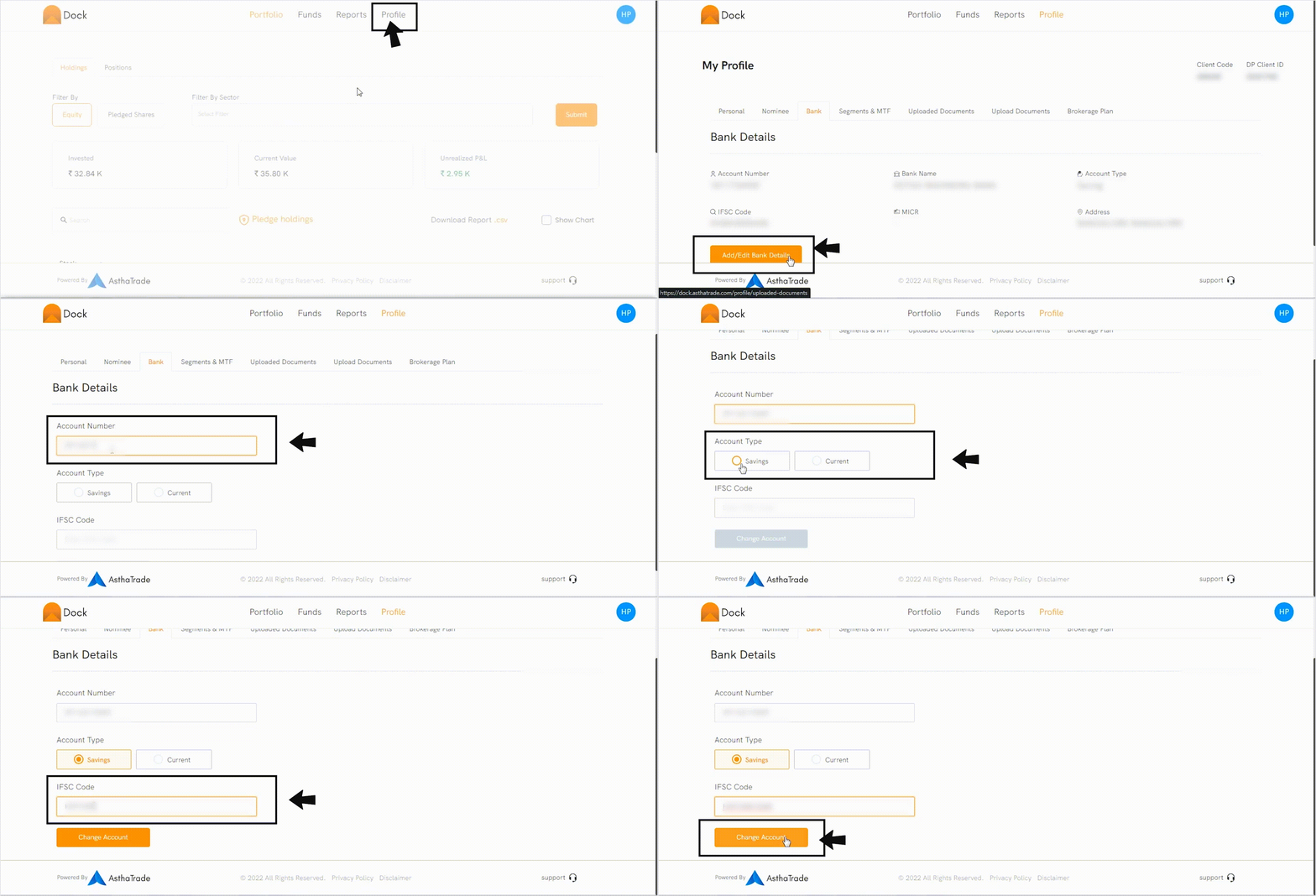
- Log in to Dock.
- Go to the Profile section.
- Click the Bank tab.
- Click Add/Edit bank details.
- Enter the account number.
- Select the Account Type — Saving or Current.
- Enter the IFSC code.
- Click Change Account.
Follow the video for steps:
What if my bank only changed the branch IFSC or MICR, not my account number?
Use the same flow — re-enter your existing account number along with the new IFSC code. Rupeezy doesn't ask for a MICR code anywhere in this form, so there's nothing separate to update for it.
What happens after I update my bank account?
The bank account you update becomes your primary account for your demat and trading account. Dividends, other corporate-action benefits on your holdings, and withdrawal payouts are transferred to this primary account.
Things to keep in mind
- You can only change your bank account after your Rupeezy demat and trading account has been opened.
- An outdated IFSC or account number is a common reason a bank transfer bounces back to your bank instead of reaching Rupeezy — update it here before resending.
- For charges, see the Rupeezy pricing page.