
To transfer money to your Rupeezy account by IMPS, NEFT or RTGS, open Add Funds in the Rupeezy app and tap Bank Transfers under Other Options. That screen shows the bank name, account number, account type, IFSC code and beneficiary name to send the money to. You add those details as a beneficiary in your own bank's app or netbanking and make the transfer from there. The account number shown is your own virtual account number, and the money must come from a bank account linked to your Rupeezy account.
Where do I find my Rupeezy bank transfer details?
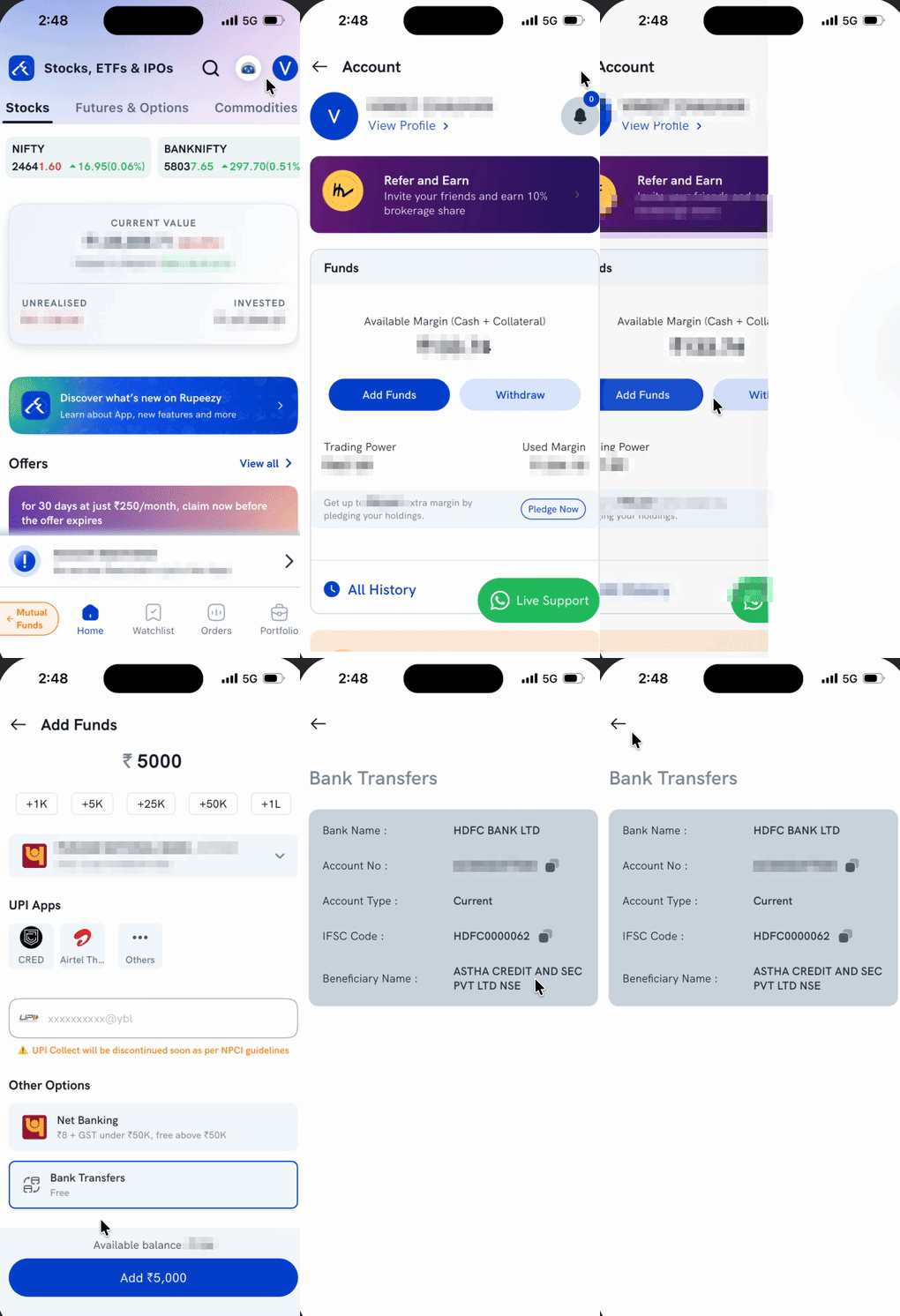
- Tap your profile icon on the Home screen to open Account.
- In the Funds card, tap Add Funds.
- Scroll down to Other Options and tap Bank Transfers.
- The Bank Transfers screen lists Bank Name, Account No, Account Type, IFSC Code and Beneficiary Name.
- Tap the copy icon next to Account No and IFSC Code to copy them, rather than typing them out.
Why is the account number unique to me?
Rupeezy gives every client their own virtual account number for bank transfers. It's made up of ACSNSE followed by your client code — so when your money arrives, Rupeezy can tell straight away that it came from you and credit it to your trading account. That's why a transfer to a number taken from a screenshot, an old message or someone else's app won't reach your account. Copy the number from your own Bank Transfers screen rather than typing it.
The amount box at the top of the Add Funds screen does not control a bank transfer. The amount that reaches your Rupeezy account is whatever you send from your bank.
What do I do in my bank's app after that?
The transfer itself happens in your bank, not in Rupeezy:
- Open your bank's app or netbanking and go to Add beneficiary (some banks call it add payee or manage payees).
- Enter the account number, IFSC code and beneficiary name exactly as the Bank Transfers screen shows them, and select the account type shown.
- Wait for your bank to activate the beneficiary. Most banks apply a short cooling-off period the first time you add one.
- Once it is active, send money to that beneficiary using IMPS, NEFT or RTGS.
Do this from the bank account you have linked to Rupeezy. A transfer from any other account will not be credited to your trading account.
Which one should I use — IMPS, NEFT or RTGS?
All three reach the same Rupeezy account, so pick whichever suits the amount and the time of day:
- IMPS — settles instantly and runs 24×7, including weekends and bank holidays. Best when you need the money in your trading account quickly.
- NEFT — settles in batches rather than instantly, and also runs 24×7.
- RTGS — meant for high-value transfers and can only be used for ₹2,00,000 and above, which is a limit set by the RBI, not by Rupeezy.
Your own bank decides the per-transaction limits, daily limits and any transfer charges on each of these, so check those in your banking app before you send a large amount.
Can I transfer money from any bank account?
No. The money has to come from a bank account linked to your Rupeezy account — SEBI regulations require this. A transfer from an account that is not linked is treated as a third-party payment and is not credited to your trading account.
To link a new bank account, see How do I change my bank account number? If you have already sent money from an unlinked account, see Can I transfer funds from bank accounts that are not linked to my Rupeezy account? for how to get it sorted.
Is there a charge for a bank transfer?
The Add Funds screen shows Bank Transfers as Free, against ₹8 + GST for Net Banking on transfers under ₹50,000. Your own bank may still charge you for an IMPS, NEFT or RTGS transfer — that charge is set by your bank.
Important: The account number on the Bank Transfers screen is unique to you. Never use an account number from a screenshot, a forwarded message, or someone else's app — always copy it from your own Bank Transfers screen. Money sent to the wrong account number will not reach your trading account.
Things to keep in mind
- Send from the same bank account you gave during account opening, or another account you have since linked.
- A bank transfer is not instant end to end — your bank has to process it and Rupeezy has to receive it. If the money has left your bank but is not showing in the app, see Why are my transferred funds not updated?