
You can add money to your Rupeezy account using UPI from the Funds section of the Rupeezy app. Enter the amount, pick a UPI app or enter your UPI ID, tap Verify & Add, then approve the payment request in your UPI app. The money has to come from a bank account already linked to your Rupeezy account.
How do I add money using UPI on the Rupeezy app?
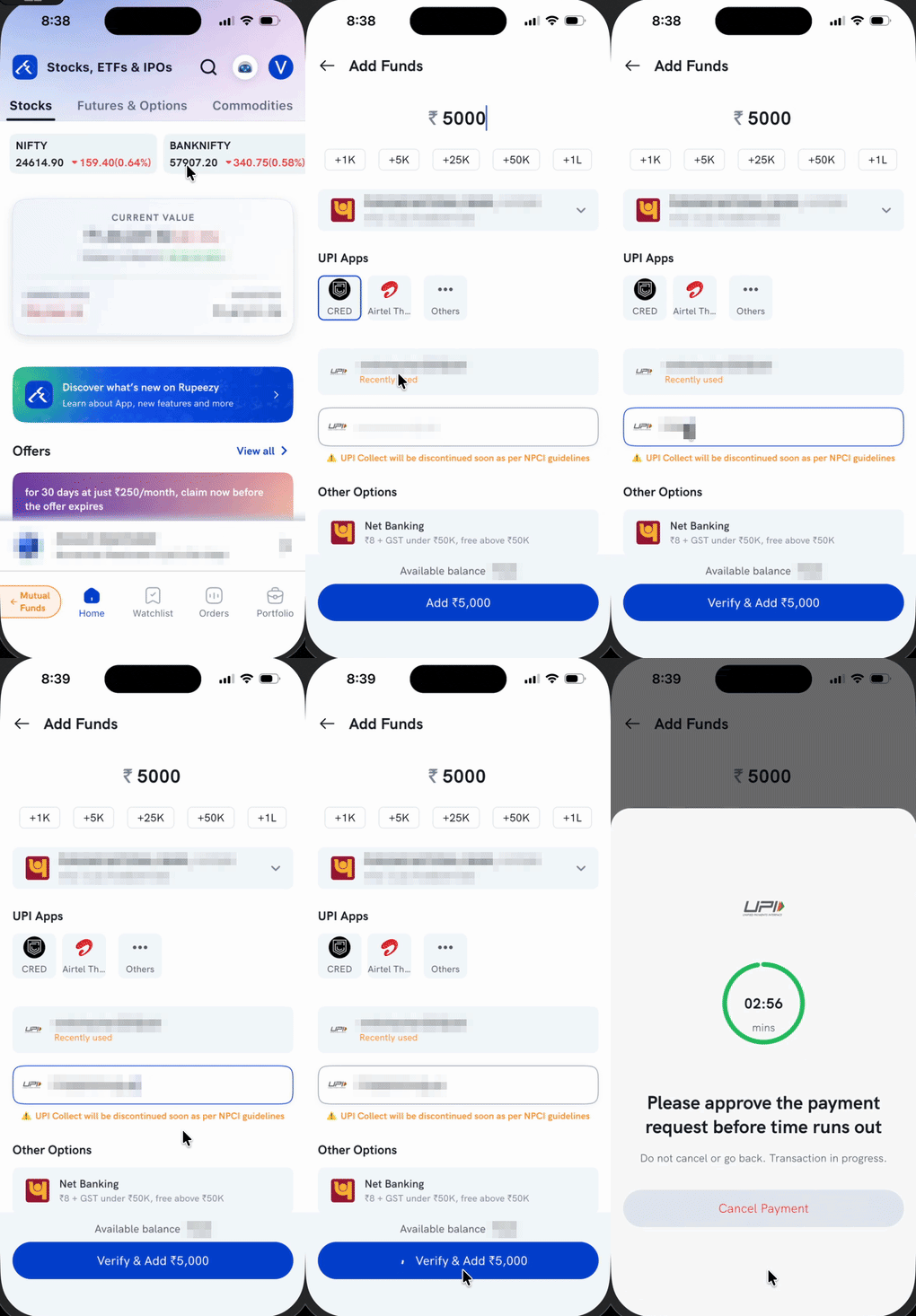
- Tap your profile icon on the Home screen to open Account.
- In the Funds card, tap Add Funds.
- Enter the amount you want to add. You can also tap a shortcut — +1K, +5K, +25K, +50K or +1L — to add that value to the amount.
- Check the bank account shown under the amount. If you have more than one bank linked, tap the row to switch.
- Under UPI Apps, tap the app you want to pay from, or use Others to see the rest. To pay by UPI ID instead, tap the UPI ID field and type it in — a recently used UPI ID appears above the field if you have paid before.
- Tap Verify & Add ₹.
- Open your UPI app and approve the payment request.
Which UPI options can I choose from?
The Add Funds screen gives you two ways to pay with UPI:
- UPI Apps — tap the app you want to pay from and approve the payment there.
- UPI ID — type a UPI ID (for example,
yourname@bank) and Rupeezy sends a collect request to that ID for you to approve. - UPI QR code — on Rupeezy web on a desktop, you can scan a QR code with your phone's UPI app instead.
If you would rather not use UPI, Net Banking is listed under Other Options on the same screen.
Can I pay directly from my UPI app instead of starting in Rupeezy?
No. You always start on the Add Funds screen in the Rupeezy app — tapping a UPI app or entering a UPI ID there is what creates the payment request tied to your account. Opening your UPI app on its own and sending money to Rupeezy without going through Add Funds first is not part of the flow, and a payment made that way is not recognised as your pay-in.
Why does the app show a notice about UPI Collect?
Paying by typing a UPI ID is called UPI Collect, and the app shows a notice that UPI Collect will be discontinued as per NPCI guidelines. When that happens is up to NPCI, not Rupeezy. Paying through the UPI Apps row is the option to prefer, since it keeps working after UPI Collect goes away.
What happens after I tap Verify & Add?
The app opens a payment screen with a countdown that starts at 3 minutes and the message "Please approve the payment request before time runs out". Approve the request in your UPI app while that timer runs.
Important: Do not cancel the request or go back while the transaction is in progress. If the timer runs out before you approve, the request lapses and you will need to start the transfer again.
Things to keep in mind
- Money can only come from a bank account linked to your Rupeezy account — UPI payments from any other account will not be credited.
- Keep the app open on the payment screen until your UPI app confirms the payment.
- Funds are credited to your account as soon as the payment succeeds. If the money has left your bank but is not showing in the app, see Why are my transferred funds not updated?