
Rupeezy doesn't use a separate "user ID" to log in — you sign in with your registered mobile number and an OTP (or a TOTP, if you've set one up), the same way across the Rupeezy app, Rupeezy web, Dock and the TV terminal. What people usually mean by "user ID" is your Client Code — the unique code that identifies your Rupeezy account. It identifies you, but you never type it to sign in.
What is my Client Code, and where do I find it?
Your Client Code is a short alphanumeric code that Rupeezy and the exchanges use to identify your account — on contract notes, statements, and when you contact support.
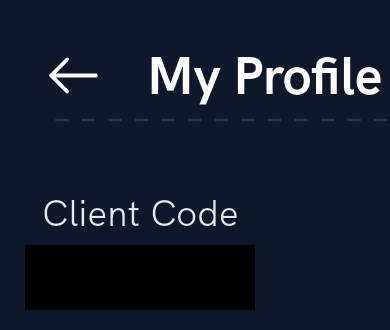
To see yours on the Rupeezy app:
1. Open the app and tap Account.
2. Tap View Profile.
3. Your Client Code is shown near the top of the My Profile screen, next to your DP Client ID.
Do I need my Client Code to log in?
No. Logging in only needs your registered mobile number, then an OTP (or a TOTP from an authenticator app) and your MPIN. Your Client Code is an account identifier, not a login credential — it isn't something you type on the login screen. To set up a TOTP, see How do I set up TOTP for app login?.
Is the same ID used on the app, Rupeezy web, Dock and the TV terminal?
Yes. The same mobile number and login work across the Rupeezy app, Rupeezy web, Dock and the TV terminal, and your Client Code stays the same everywhere too — it identifies one account, not one surface. For your mutual fund login ID, see What is my mutual fund login ID and how to log in?.
Things to keep in mind
- Your Client Code isn't a secret — you can share it with Rupeezy support to identify your account. Never share your OTP or MPIN, though, with anyone, including someone claiming to be from Rupeezy — support will never ask for those.
- Looking for your Client Code to give to support or fill in a form? The My Profile screen is the fastest place to find it.