
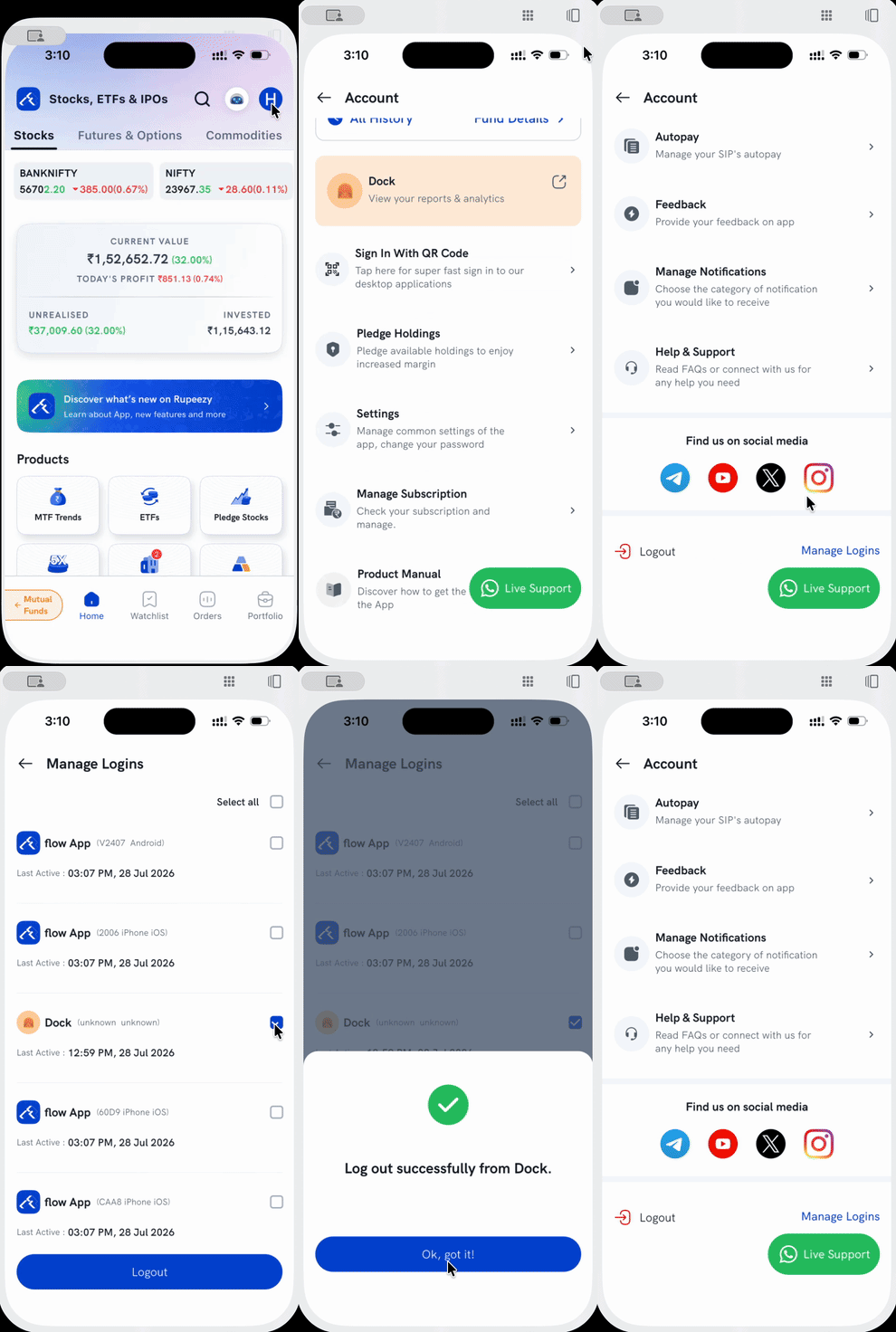
Manage Logins shows every active session logged in to your Rupeezy account — across devices and apps (the Rupeezy app, Dock, and other connected apps) — and lets you log out any of them you don't recognise or no longer want active.
How do I revoke a login?
1. Open Manage Logins — tap your profile icon on the Home screen to open Account, scroll down, and tap Manage Logins (next to Logout).
2. Review the list — each entry shows the app, the device it's on, and when it was Last Active. You can also use Select all.
3. Select the session(s) to revoke, then tap Logout. You'll see a confirmation once it's done.
What if I don't recognise a session?
Revoke it the same way — select it and tap Logout. If you're unsure why an unfamiliar session appears, it's worth changing your password and contacting Rupeezy support. You can also freeze your account instantly with the kill switch if you suspect someone else has access.