
You can modify an already-submitted IPO application from IPOs > Applied on the Rupeezy app — but only to increase your price and/or lot count, since SEBI rules don't allow reducing an already-submitted application, in any investor category.
How to Modify an IPO Application
-
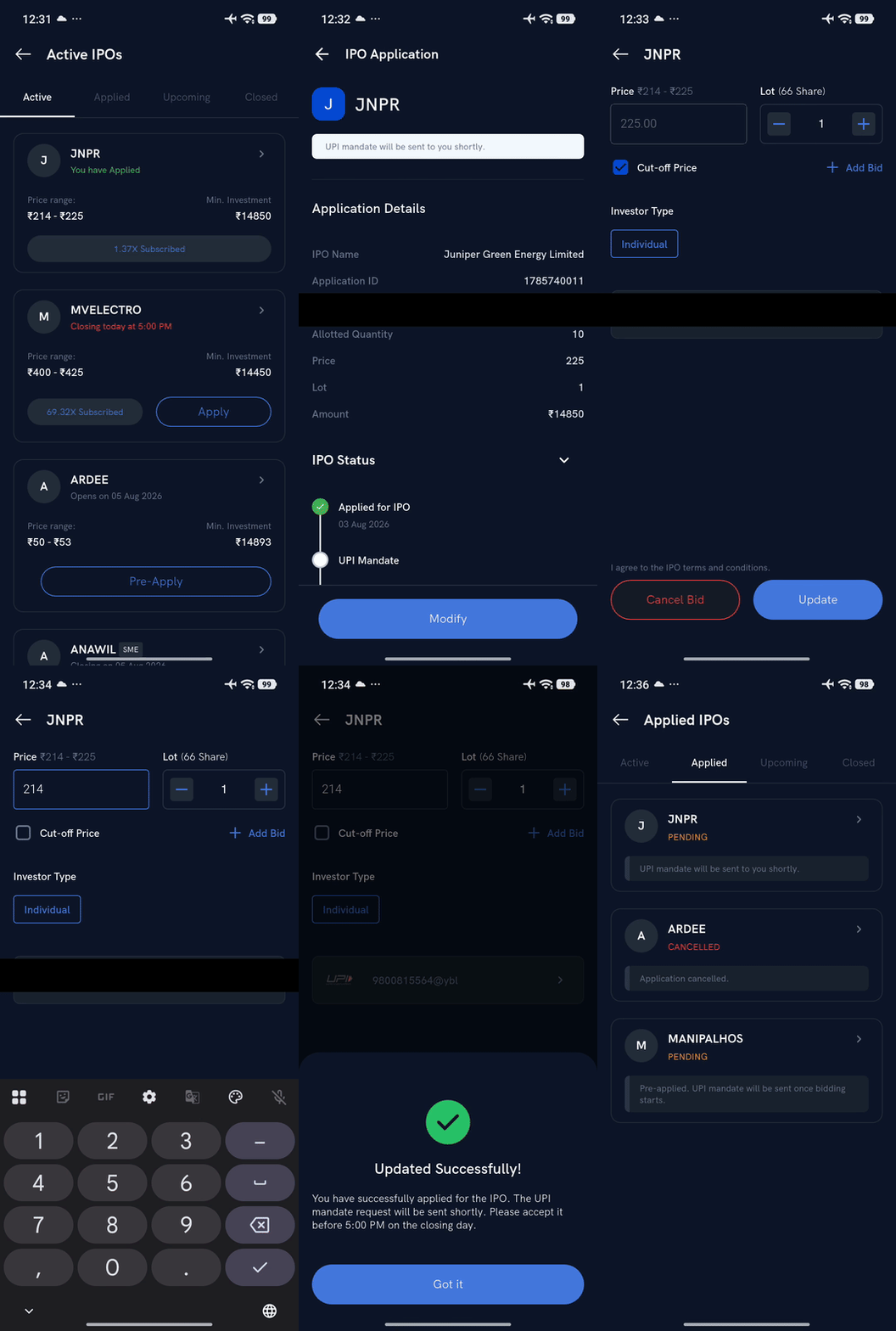
Go to IPOs > Applied.
-
Tap the IPO application you want to modify.
-
Tap Modify.
-
Update the price (clear Cut-off Price to enter a custom bid) and/or the number of lots as required.
-
Agree to the IPO terms and conditions, then tap Update.
-
Approve the new UPI mandate in your UPI app.
Your modified bid is submitted after mandate approval. Allotment is decided by lottery among all valid applications at the close of the bidding window — modifying earlier or later doesn't affect your chances; only the final price and lot size you submit matter.
Note: Modification is allowed only within the IPO bidding window, and only to increase your price and/or lot count — SEBI rules don't allow reducing an already-submitted application, in any investor category.
For the full application flow, see How do I apply for an IPO?.