
An Initial Public Offering (IPO) is the process by which a private company offers its shares to the public for the first time. Through IPOs, investors can subscribe to shares and become part owners of the company.
How to Apply for an IPO
-
Log in to the Rupeezy app.
-
Go to the IPOs tile from the home screen (under Products).
-
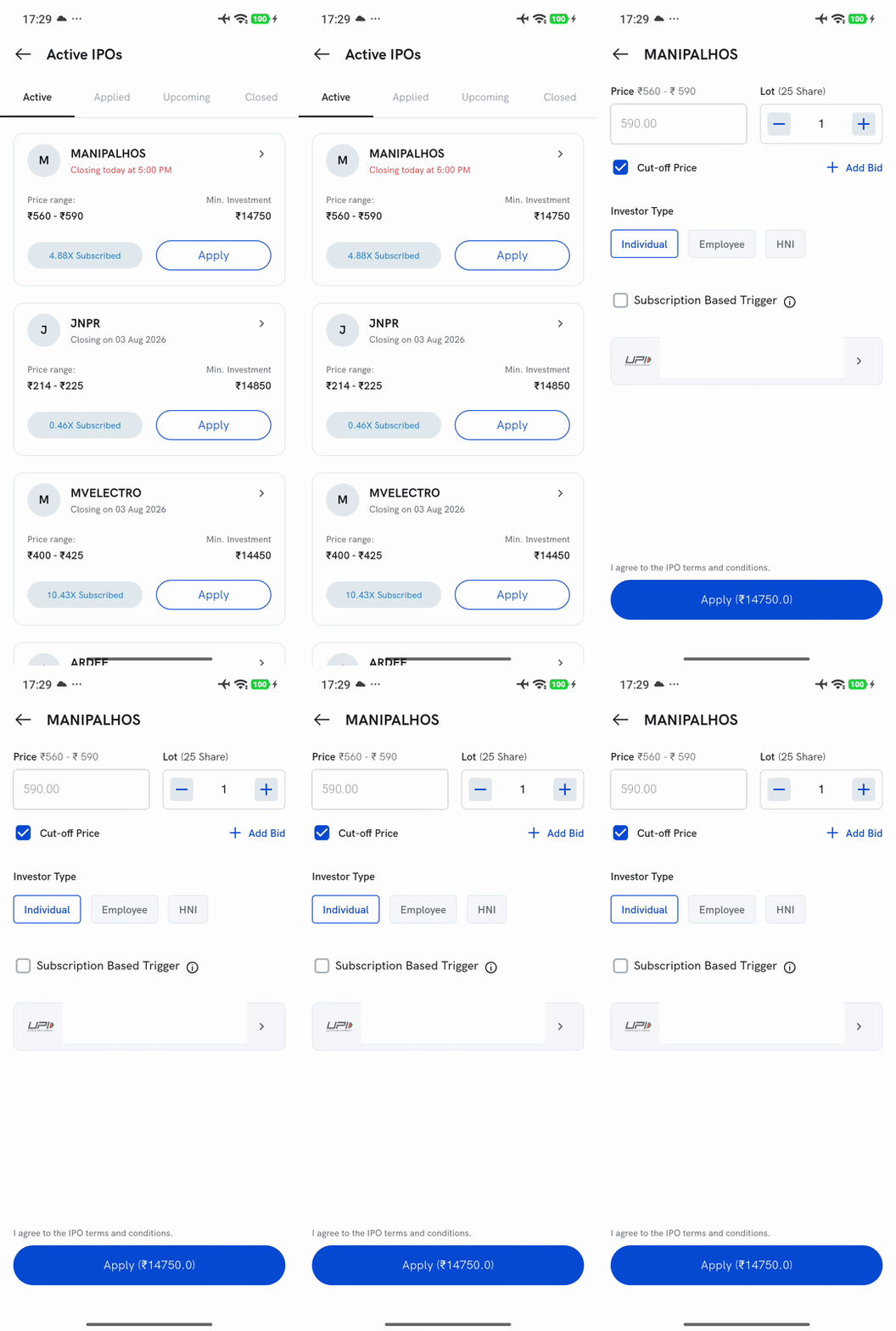
Browse the list of live and upcoming IPOs under the Active tab.
-
Tap Apply on the IPO you wish to apply for.
-
Enter the following details:
-
Investor category (Individual / Employee / HNI)
-
Price — tick Cut-off Price to bid at the final issue price, or clear it to enter your own custom bid within the price band
-
Number of lots
-
UPI ID for payment authorization
-
-
Agree to the IPO terms and conditions, then tap Apply.
-
Approve the mandate in your UPI app.
Your IPO application will be successfully placed after mandate approval.
Important Points to Remember
-
Ensure your UPI ID is active and linked to a valid bank account.
-
Always approve the UPI mandate for the application to be successful.
-
Refunds for unallotted shares will be credited back to your bank account.