
Redeeming a mutual fund means selling your units back to the fund to receive their value in cash. On the Rupeezy app you redeem from the fund's own screen under My Mutual Funds — tap Redeem/SWP, enter how much you want to take out, and confirm. Once the redemption is processed, the proceeds are credited to your registered bank account.
How do I redeem a mutual fund on the Rupeezy app?
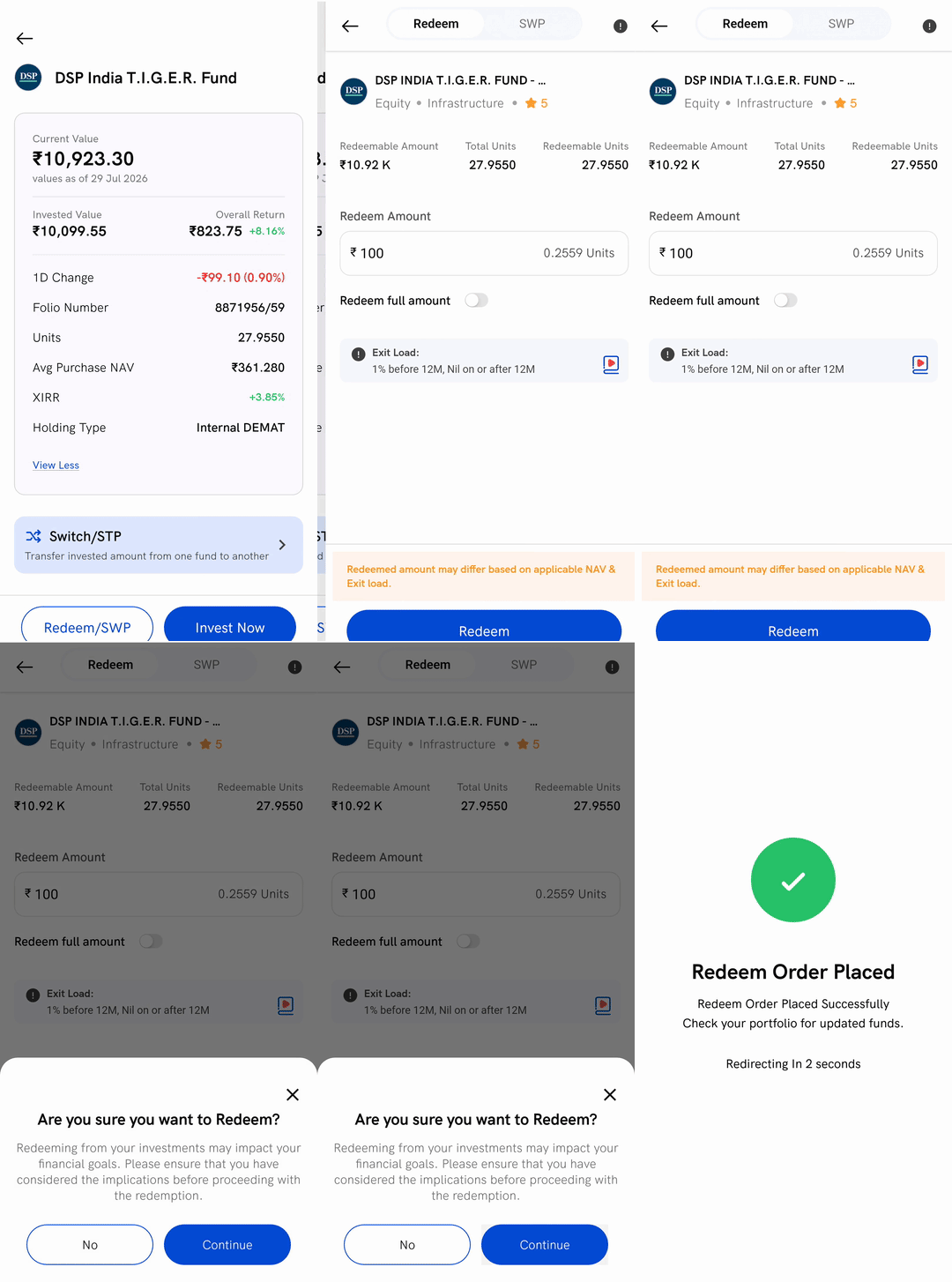
1. Open the fund — go to the Portfolio tab, and under My Mutual Funds tap the fund you want to sell. If you're not sure how to get there, see How to view mutual fund investment details on Rupeezy? first.
2. Tap Redeem/SWP — the button sits at the bottom of the fund's screen. The first time, a short How Redeem/SWP works? note appears — tap Redeem/SWP on it to continue.
3. Stay on the Redeem tab — the screen opens on Redeem, which is a one-time sale. The SWP tab beside it sets up a recurring withdrawal instead (covered in What is an SWP? below).
4. Enter the amount — the Redeem Amount field opens at the fund's minimum; type a higher figure if you want, or turn on Redeem full amount to sell your entire holding. Your Redeemable Amount and the fund's exit load are shown just above.
5. Tap Redeem, then Continue — tap Redeem, then Continue on the Are you sure you want to Redeem? prompt to place the order. A Redeem Order Placed Successfully screen confirms it's done.
What happens after I place a redemption?
Your units are sold at the fund's applicable NAV for the day, based on when your order is placed against the fund's cut-off time — not at a live, tap-time price. Because of that, and because any exit load the fund charges is deducted, the amount you finally receive can differ slightly from the figure you entered. The app flags this on the screen: "Redeemed amount may differ based on applicable NAV & Exit load."
Once the redemption settles, the money is credited to the bank account registered for your mutual fund holdings — you can check or change which account that is in Can I update the saving account for redemption of mutual fund units?. If the credited amount looks different from what you expected, Why did I receive less money than the amount I redeemed? explains why.
Can I redeem only part of my investment?
Yes. In the Redeem Amount field, enter any amount up to your Redeemable Amount — the screen shows the matching number of units as you type. To sell everything in that fund, turn on Redeem full amount instead of typing a figure. Whatever you don't redeem stays invested.
When is the Redeem/SWP button not available?
The Redeem/SWP button is greyed out when a fund can't be sold right now, with a line above it saying why:
- Redemption is blocked by AMC — the fund house has temporarily stopped redemptions for that scheme.
- Units unavailable for redemption — for example your units are already in a pending redemption order, or are still within a lock-in period (such as an ELSS fund's three-year lock-in).
- Redeeming external demat funds is not available — funds you imported that sit in another broker's demat account can't be sold through Rupeezy; you'll need to redeem them through the broker where that demat account is held. (Imported funds held in statement (SOA) form can still be redeemed here — with an OTP.)
If the fund is linked to a goal you set up, you'll also see Redeeming might affect your goal — this is a reminder, not a block, and you can still go ahead.
The first time you sell units held in your Rupeezy demat account, the app may ask you to authorise it by activating DDPI (a one-time permission that lets Rupeezy debit the units for you); once DDPI is active, no OTP is taken on each sale. If your units are instead held in statement (SOA) form, you'll confirm the redemption with a one-time password (OTP) sent to your registered mobile number and email before the order is placed. There's no separate T-PIN for mutual funds — see Do I need a T-PIN to sell mutual funds on Rupeezy? for how a sale is authorised.
What is an SWP (Systematic Withdrawal Plan)?
An SWP lets you withdraw a fixed amount from a fund at regular intervals — monthly or weekly — while the rest of your money stays invested. It's the opposite of a SIP: instead of adding a set amount each period, you take one out. For what an SWP is and when to use one, see What is an SWP (Systematic Withdrawal Plan), and when should I use it?.
To set one up, open the same fund's Redeem/SWP screen and switch to the SWP tab. Enter the SWP Amount, choose a Frequency, optionally set a Number of Instalments and (for monthly) an SWP Date, then tap Start SWP. The first withdrawal is placed the same day. As with a one-time redemption, check the fund's exit load before you start.
Things to keep in mind
- A redemption sells real units. The final amount depends on the applicable NAV and any exit load, so it can differ from the figure you entered.
- You can't cancel a redemption once you confirm it. Review the fund and amount before you tap Continue — see Can I cancel or delete a mutual fund order on Rupeezy?.
- The money goes to your bank, not the app. Sale proceeds are credited to your registered bank account once the redemption settles; the timeline depends on the fund type.
- Not every imported fund can be sold here. You can redeem funds you bought on Rupeezy, and imported funds held in statement (SOA) form; funds imported from another broker's demat account are for tracking only — to sell those, use the broker where that demat is held.