
On Rupeezy, there's no separate "pin" button — you pin a stock or index by dragging it to the top of your Watchlist. Tap the edit (pencil) icon, drag the row to the top, then tap Save Changes.
How to pin a stock or index to the top of your Watchlist
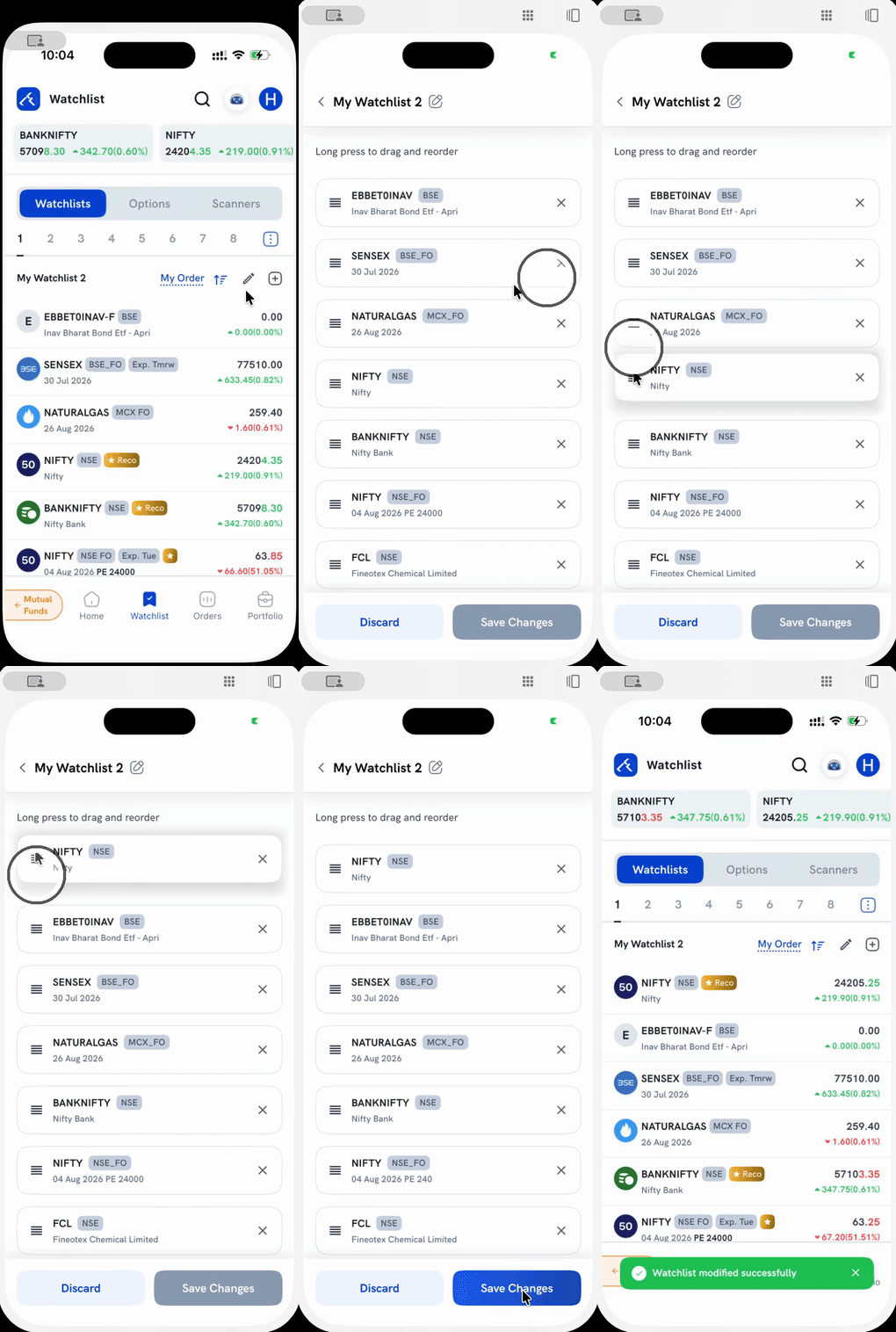
1. Open the edit screen. On your Watchlist, tap the pencil icon next to "My Order," at the top of the list.
2. Long-press and drag. Press and hold the ☰ handle on the left of the stock or index you want to pin, then drag it above every other row, all the way to the top.
3. Tap Save Changes. The screen closes and your Watchlist now shows that instrument first, in the position you dropped it.
Things to keep in mind
- The same drag lets you reorder your whole Watchlist, not just move one instrument to the top — drop a row anywhere in the list, not only at position one.
- This reorders the specific Watchlist tab you're editing (e.g. "My Watchlist 2"). If you keep the same instrument across more than one Watchlist tab, you'll need to repeat this on each tab.