
You don't need to add a stock to your Watchlist (marketwatch) to trade it. Search for it, tap the result to open its detail screen, and place your Buy or Sell order straight from there.
How to place an order without adding to your Watchlist
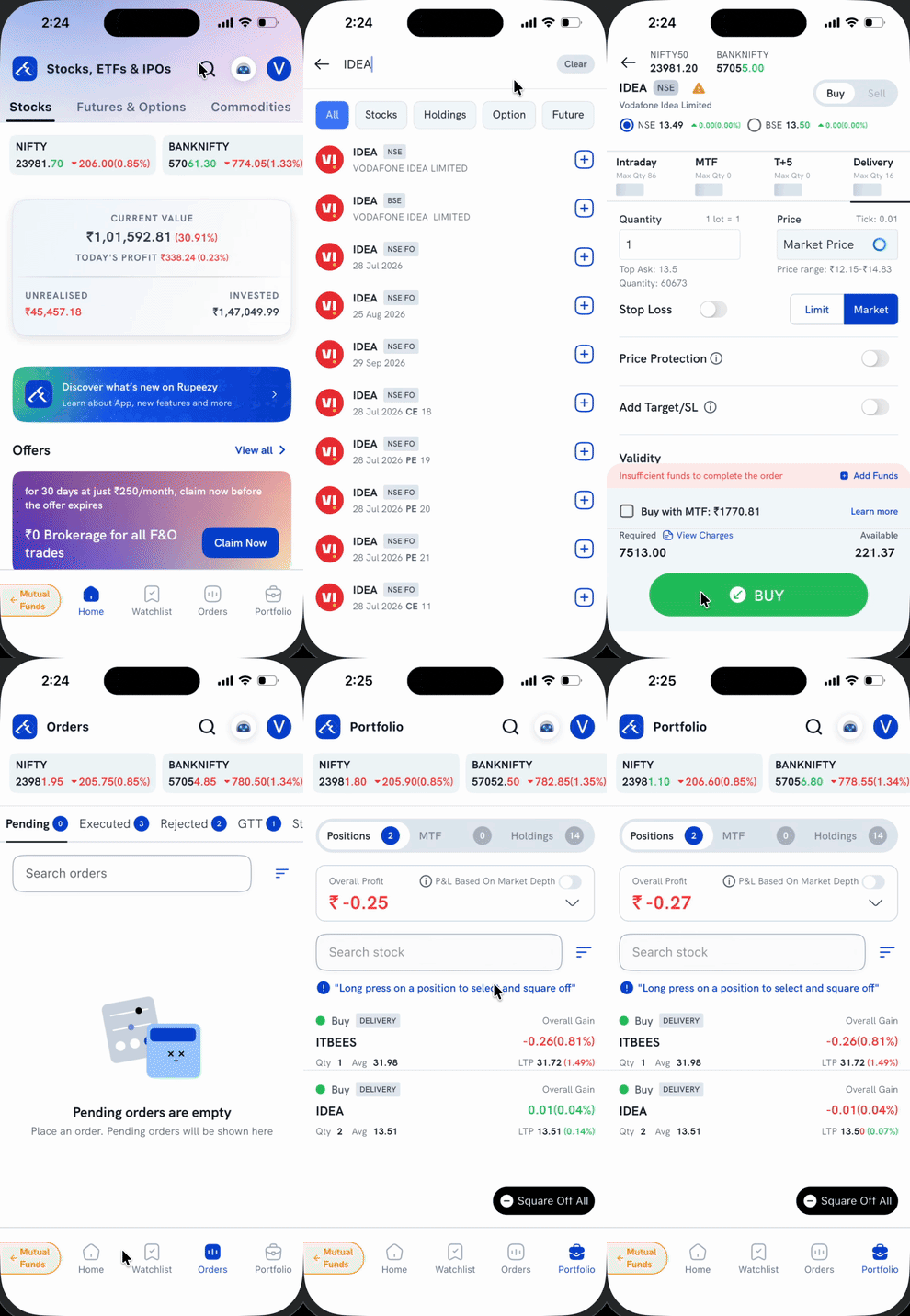
1. Tap the search icon on the Home screen.
2. Type the stock, F&O contract, or fund name you're looking for.
3. Tap the result itself — not the + button next to it. The + button adds the instrument to your Watchlist; tapping the row instead opens its detail screen without adding it anywhere.
4. Tap Buy or Sell on the detail screen to open the order form, fill in your quantity and price, and place the order as usual.
Your order goes through normally, and the instrument won't show up in your Watchlist unless you separately tap + to add it.
Things to keep in mind
- The + button next to each search result is only for adding the instrument to your Watchlist — you don't need to tap it to trade.
- A stock you buy this way still shows up in Positions, Holdings, or Orders as usual — leaving it off your Watchlist only affects whether you see its live price on your Watchlist screen.