
An order can be rejected either by Rupeezy's own checks before it's sent, or by the exchange's risk system after it's sent. The reason is always shown on the rejected order — here are the most common ones and what to do about them.
First, read the rejection message
Go to Orders → Rejected and open the order. The rejection reason is shown in red, right below the order — it tells you exactly which of the reasons below applied.
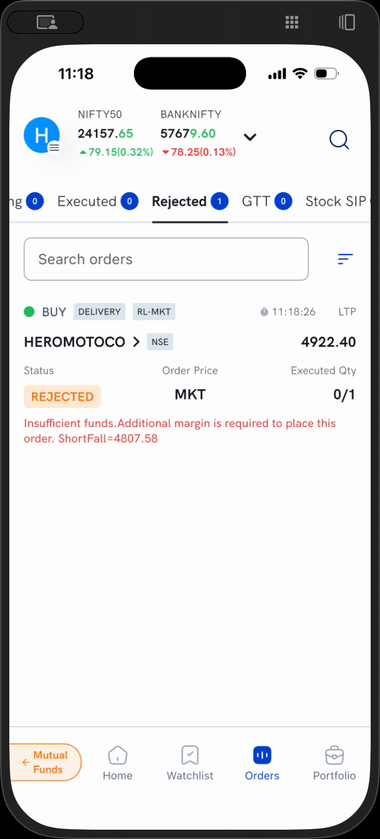
In this example the order was rejected for insufficient funds, with the exact shortfall amount shown.
The most common reasons
Most rejections come down to one of these:
- Insufficient funds / margin — the single most common reason. Add funds or reduce the quantity.
- A trading restriction on the stock — only square-off allowed, buy/sell restricted, F&O ban period, or not eligible in the pre-open.
- Price outside the day's range — your price crosses the circuit limit or is too far from the market.
- KYC or DDPI/POA pending — complete these from your account section before trading.
The full list below groups every reason, with what it means and what to do.
Full list of rejection reasons
The table below covers every rejection reason you may come across, grouped by type, with what each one means and what to do.
Funds and margin
| Message you may see | What it means and what to do |
|---|---|
| Insufficient funds / margin shortfall | You don't have enough balance or margin. Add funds, reduce the quantity, or close other positions. |
Trading restrictions on the stock
| Message you may see | What it means and what to do |
|---|---|
| Only square-off (closing) is allowed for this stock | Fresh positions are restricted in this stock; you can only reduce or close an existing one. |
| Buy is not allowed for this stock | Buying is currently restricted in this stock. |
| Sell is not allowed for this stock | Selling is currently restricted in this stock. |
| Stock is in the F&O ban period | The contract has crossed its market-wide position limit; only position-reducing orders are allowed until it exits the ban. |
| Stock is not eligible in the pre-open session | This stock can't be traded during the pre-open; try after normal market opens. |
| Stock is not allowed to trade in this market right now | The stock isn't tradable in that segment/session at the moment. |
| MTF trading is not allowed for this stock | The stock isn't in the MTF-eligible list. Use Intraday or Delivery instead. |
| The contract has matured | The F&O contract has expired and can no longer be traded. |
Price and price-range
| Message you may see | What it means and what to do |
|---|---|
| Price is out of the day's price range (circuit limit) | Your price is beyond the stock's daily upper/lower circuit. Place it within the day's range. |
| Price / trigger price is out of the DPR range | Same as above — the price crosses the day's permitted band. |
| Price is out of the limit price-protection range | Your price is too far from the current market price. Move it closer. |
| Price is out of the current execution range | The price is outside the range currently accepted for execution. |
| Order could result in a trade price beyond the mark-up price | The order would execute beyond the allowed price-protection cap. |
| Order cancelled due to price freeze | The exchange briefly froze the price band; try again. |
| Price doesn't match the tick size | Round the price to the stock's valid tick (price step). |
Stop-loss / trigger orders
| Message you may see | What it means and what to do |
|---|---|
| Stop / trigger price is not reasonable | The trigger price is too far from the current market price. Set it closer. |
| Stop-limit order price-range check failed | The limit and trigger prices don't fall in the accepted range. |
| Difference between limit and trigger price is out of range | Reduce the gap between your limit price and trigger price. |
| Price should be greater/less than the trigger price | For an SL order, set the limit and trigger prices in the correct order (buy vs sell). |
| SL-Market order not allowed | An SL-Market order isn't allowed for this scrip; use SL-Limit. |
Quantity and lot size
| Message you may see | What it means and what to do |
|---|---|
| Quantity exceeds the freeze limit | Your quantity is above the exchange's per-order freeze limit. Split it into smaller orders. |
| Only board-lot market orders are allowed | Place the order in valid lot multiples. |
| Invalid quantity / quantity must be at least 1 | Enter a valid quantity (whole lots). |
Order type, validity and product
| Message you may see | What it means and what to do |
|---|---|
| Market orders aren't available for this stock | Place a limit order instead. |
| Market order not allowed — contract hasn't traded yet | No trade has happened yet; use a limit order. |
| Validity not supported — try a DAY order | The chosen validity isn't allowed here; use DAY. |
| MTF orders cannot be placed for BSE Equity | MTF isn't supported for BSE equity; use NSE or a different product. |
| Position cannot be converted for this scrip | Intraday/Delivery conversion isn't allowed for this scrip or for T+5/sold positions. |
Timing
| Message you may see | What it means and what to do |
|---|---|
| Please place an AMO after market hours | You placed a normal order while the market was closed. Use an After Market Order. |
| Only AMO allowed in AMO timing | You placed an AMO during live market hours. Place a normal order instead. |
| IOC order cancelled | An Immediate-or-Cancel order didn't fill instantly, so it was cancelled — this is expected. |
| Queued order withdrawn | A queued order was withdrawn by the system (e.g. session change). Re-place it. |
Account and compliance
| Message you may see | What it means and what to do |
|---|---|
| KYC is not updated | Complete your KYC before trading. |
| MTF / AMO-Sell order needs DDPI/POA | Submit your DDPI/POA to place MTF or sell orders. |
| Your IP is not allowed | Your network isn't permitted for this action; contact support. |
Modifying or cancelling an order
| Message you may see | What it means and what to do |
|---|---|
| Order time has changed / is incorrect for modification or cancellation | The order's state changed before your request went through; refresh and check its status. |
| The order cannot be modified / cannot be cancelled | The order is already executed, withdrawn, or otherwise no longer open. |
| Order request withdrawn by user / system | The order was withdrawn; place a new one if needed. |
| Order not found | The order no longer exists in the current session. |
System / other
| Message you may see | What it means and what to do |
|---|---|
| Order error — please check all values | One of the order values is invalid; review price, quantity, and type. |
| Undocumented exchange error | An uncommon exchange error. Note the message and contact support if it repeats. |
Still not sure why?
If the rejection message isn't clear, contact Rupeezy support with your order number and the rejection message shown on the order, and the team will help you.