
An AMC SIP is a SIP (Systematic Investment Plan) that is registered directly with the mutual fund's AMC (Asset Management Company) and processed through BSE, the mutual-fund platform Rupeezy's orders run on. Like any SIP, it invests a fixed amount in your chosen fund at a regular interval through an auto-debit mandate. What sets it apart is flexibility: an AMC SIP is delete-only — once it's running it can't be edited, paused, resumed or stepped up, and its frequency is fixed. That makes it a good fit for disciplined, long-term investing where you don't expect to change the plan. On the Rupeezy app you create one from a fund's page by turning on the AMC SIP toggle before you pay.
What is an AMC SIP?
An AMC SIP invests a fixed amount in a mutual fund at a set interval, exactly like a regular SIP — but the instruction sits directly with the fund house (AMC) instead of being managed inside the app, and it's registered and processed through BSE. Because it runs at the AMC level, it's very reliable for hands-off, long-term investing: instalments continue automatically without any action from you.
The trade-off is flexibility. Compared with a standard Flexi-SIP — the SIP you'd normally set up in the app — an AMC SIP has no edit, pause, resume or step-up options, and you can't change its frequency after it's created. If you ever need to stop it, the only option is to delete it.
How is an AMC SIP different from a regular SIP?
| Flexi-SIP (standard) | AMC SIP | |
|---|---|---|
| Edit amount or date | Yes | No |
| Pause and resume | Yes | No |
| Automatic step-up | Yes | No |
| Change frequency | Yes | No (fixed) |
| Stop it | Delete | Delete (only option) |
A Flexi-SIP is the standard SIP you set up in the app — you can edit, pause, resume or delete it whenever you like. An AMC SIP can only be deleted. Everything else about the investment — units, NAV, rupee cost averaging — works the same for both.
How do I create an AMC SIP on Rupeezy?
You create an AMC SIP from a fund's page just like a regular SIP — the only extra step is turning on the AMC SIP toggle before you pay.
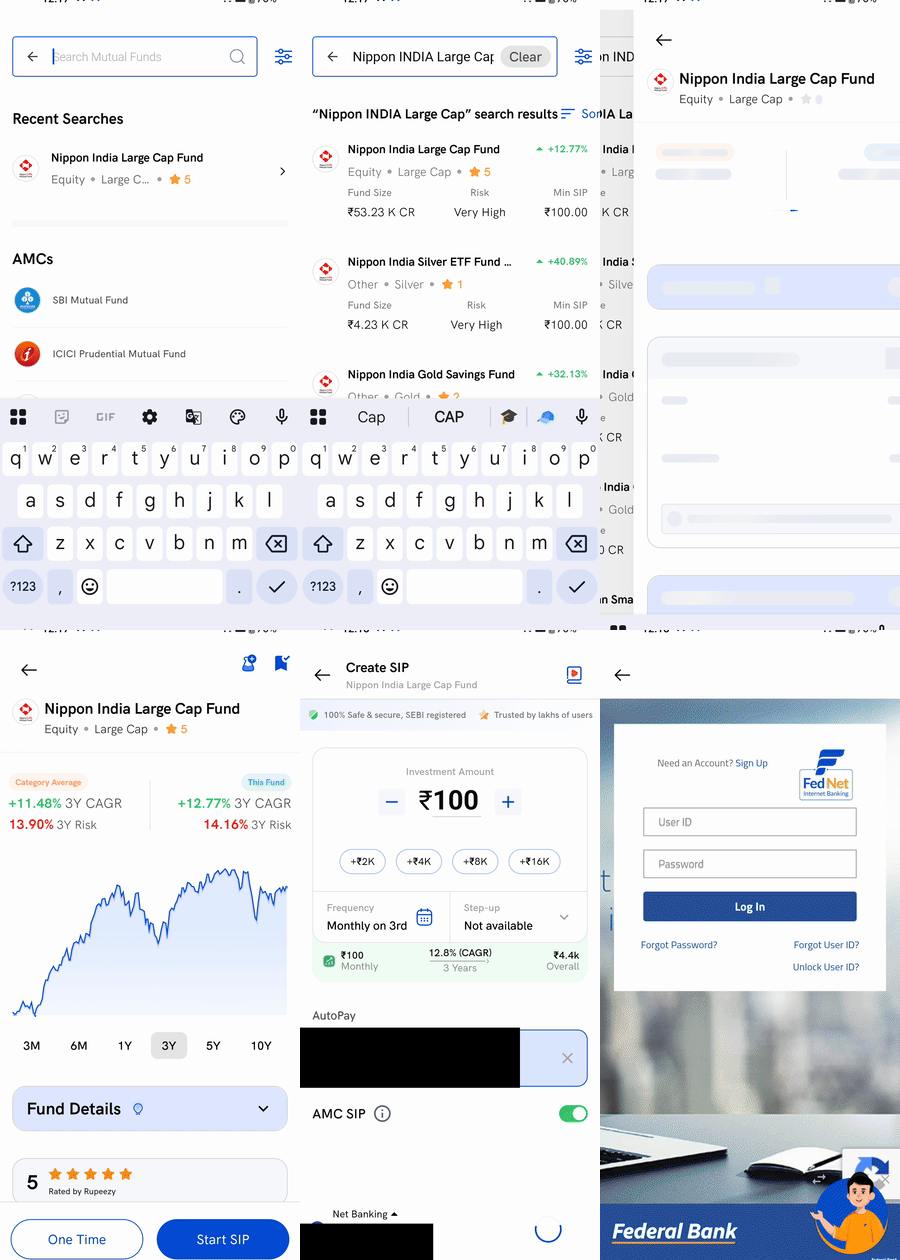
1. Search for the fund — tap Explore, search for the mutual fund you want, and open its page.
2. Tap Start SIP — on the fund page, tap Start SIP (not One Time).
3. Set your amount — enter how much to invest each interval, at least the fund's Min SIP.
4. Turn on the AMC SIP toggle — switch on AMC SIP. The screen title changes from Create Flexi-SIP to Create SIP, and Step-up now shows Not available — a reminder that step-up (and pause and edit) don't apply to an AMC SIP. Tap the ⓘ next to AMC SIP anytime to see what changes.
5. Pay the first instalment — tap Invest, choose your payment method (for example Net Banking), and complete the payment. This also sets up the auto-debit mandate for your future instalments.
Why does my new AMC SIP show "Processing"?
Right after you create an AMC SIP, it can show as Processing for about 10–20 minutes while it's being registered at the AMC through BSE. This is normal — it's handled by BSE and you don't need to do anything. Once it's registered, the SIP becomes active and runs on its schedule.
Things to keep in mind
- An AMC SIP is delete-only. It can't be edited, paused, resumed or stepped up, and its frequency can't be changed. If you want that flexibility, set up a standard Flexi-SIP instead.
- Deleting an AMC SIP never sells your units. It only stops future instalments — the money you've already invested stays in the fund, and you redeem those units separately whenever you want. To delete an AMC SIP, see How to modify, pause or delete a SIP on the Rupeezy app.
- Mutual fund investing is on the Rupeezy mobile app. AMC SIPs are created and managed in the app.