
A SIP (Systematic Investment Plan) lets you invest a fixed amount in a mutual fund automatically at a regular interval. On the Rupeezy app you start one from any fund's page — search the fund, set your instalment amount and SIP date, then pay the first instalment and approve a one-time AutoPay mandate so future instalments are debited automatically.
How to start a SIP on the Rupeezy app
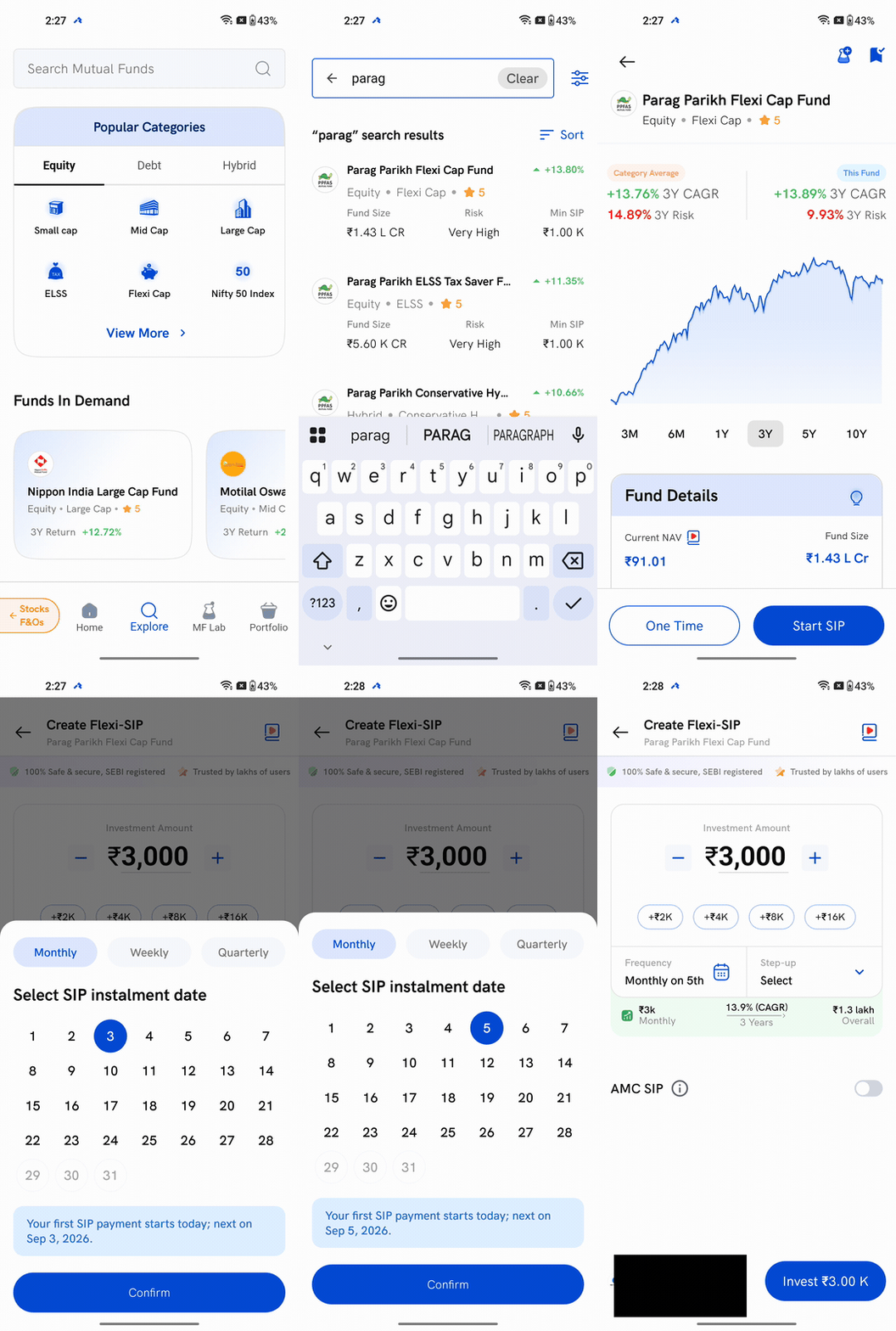
1. Search for the fund — tap Explore, then search for the mutual fund you want to invest in.
2. Open the fund page — tap the fund from the results to see its NAV, returns and details.
3. Tap Start SIP — the fund page shows two options, One Time and Start SIP. Tap Start SIP to set up a recurring investment.
4. Enter the instalment amount — set how much to invest each interval using the +/− buttons or the quick-add chips. The minimum is the fund's Min SIP amount.
5. Choose the SIP date and frequency — tap the calendar to pick the date your instalment runs, and switch between Monthly, Weekly or Quarterly if you like. Your first instalment starts today, and the next one runs on the date you choose.
6. Tap Invest — review the amount, then tap Invest ₹… (it shows your instalment amount).
7. Pay and set up AutoPay — pay the first instalment via UPI, net banking or NEFT. Starting the SIP also registers an AutoPay mandate, so your future instalments are debited automatically.
When does my first SIP installment happen?
Your first instalment is paid right away when you start the SIP. After that, each instalment is auto-debited on the SIP date you chose — for example, monthly on the 5th. For how those automatic debits work, see How are automatic monthly installments processed for payment?
Things to keep in mind
- The minimum instalment is set by the fund, not by Rupeezy — check the Min SIP shown on the fund's page before you start.
- Your SIP runs on an AutoPay mandate. You can check whether it's active anytime — see How do I check my AutoPay (mandate) status on Rupeezy?
- As your income grows, you can raise your instalment automatically with an Automatic Step-up SIP.
- To change, pause or delete this SIP later, see How to modify, pause or delete a SIP on the Rupeezy app?