
You can add single or multiple nominees to your Rupeezy demat account online.
How to add a nominee
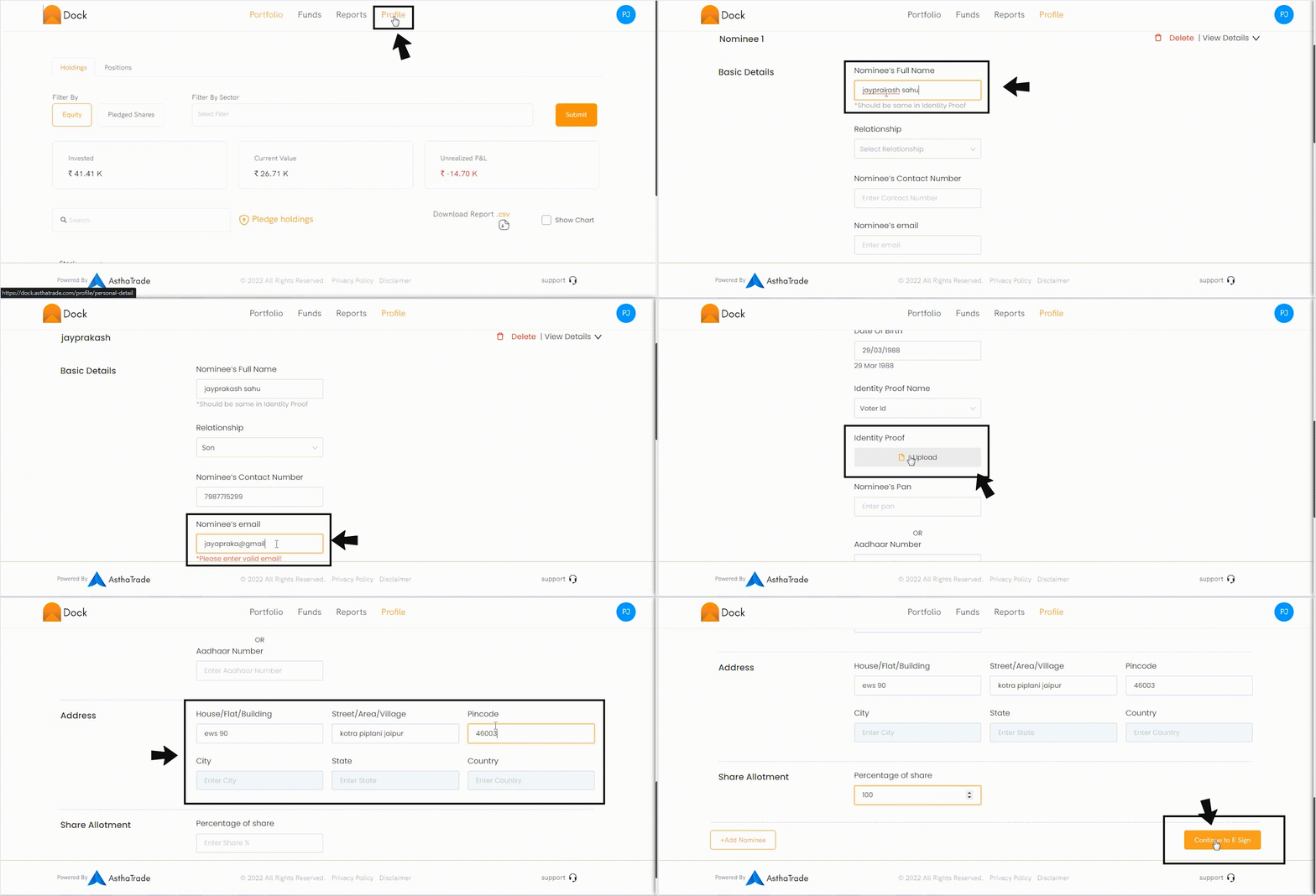
To add Nominee, login to your Rupeezy Dock app.
- GO to ‘Profile’ section.
- Select ‘Nominee’ tab and click on ‘Add Nominee’
- Enter Nominee’s full name.
- Select Nominee’s ‘Relationship’ from the dropdown menu.
- Enter Nominee’s mobile number and email id.
- Enter the Nominee’s Date Of Birth.
- Select the Nominee’s ‘Identity Proof’ from the dropdown list.
- Upload the copy of the identity proof document(Valid documents: PAN / Passport / Aadhaar / Driver's Licence / Voter ID / Birth certificate (in case of minor) in PDF format)
- Next, enter Nominee’s PAN no and Complete Address
- Specify the nominee’s percentage of share from the dropdown menu.
- In case you want to nominate more than one person, select ‘Add Nominee’. You can add up to three nominees to your account.
- Select ‘Continue to Esign’ to complete the process.
For the charges, please click here