
You can square off open positions on the Rupeezy app one at a time, by selecting a few, or all at once — and you can set exactly which position types get closed when you use Square Off All.
How do I square off a single position?
Tap any open position, then tap Square Off. This opens the square-off order screen, where you can set the quantity, price, and other order details.
How do I square off a few selected positions?
To square off only some of your positions:
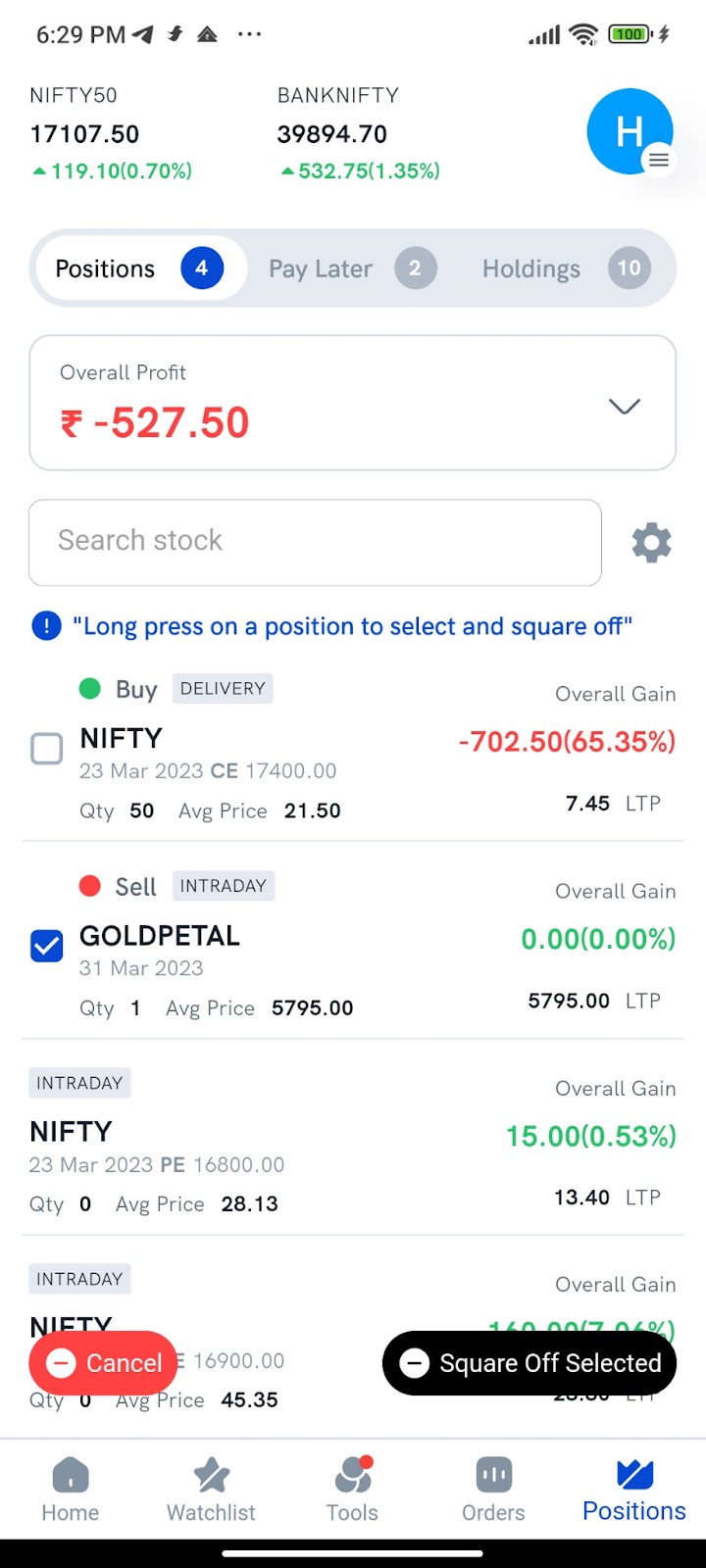
- Long-press any position — the selection control appears on the left.
- Select the open positions you want to square off.
- Tap Square-Off Selected at the bottom of the Positions screen. The selected positions are squared off at market price.
- To leave selection mode, tap Cancel at the bottom of the screen.
How does Square Off All work?
Closing multiple positions quickly can help you limit losses, especially in a volatile market. With Square Off All, you decide which position types are closed when you tap the button.
Go to Profile → Settings → Square Off All preference to choose the position types.
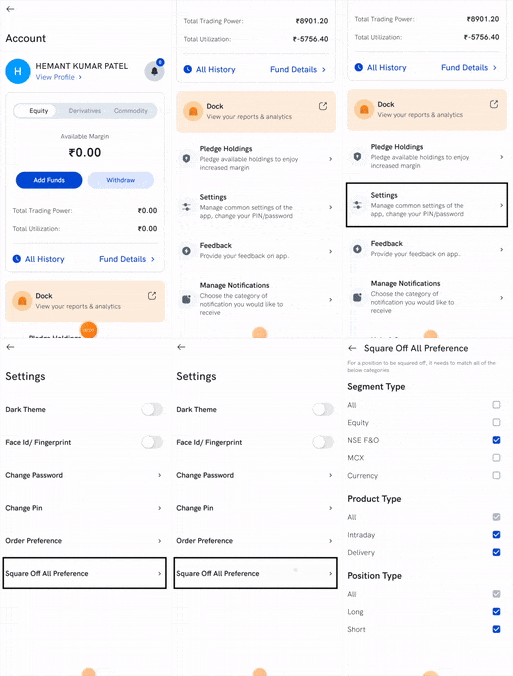
Preferences have three sections:
- Exchange Segment — NSE Equity, NSE F&O, Currency, and MCX
- Product Type — Intraday and Delivery
- Position Type — Long and Short
When you tap Square Off All, a confirmation dialog shows which positions will be closed. On confirmation, positions that match a selected checkbox in all three sections are squared off at market price.
Note: Square Off All does not apply to MTF positions — square those off separately.
How position matching works
- All checkboxes selected → on confirmation, every open position is squared off at market price.
- A {Carryforward, Long} position in NIFTY 17600 CE, with NSE F&O not selected but Delivery and Long selected → not squared off, because it doesn't match the Exchange Segment section.
- An {Intraday, Long} position in NIFTY 17600 CE, with Long not selected but NSE F&O and Delivery selected → not squared off, because it doesn't match the Position Type section.
- To square off only NSE F&O and nothing else → in Exchange Segment select only NSE F&O, and select everything in Product Type and Position Type. On confirmation, all NSE F&O positions are squared off.
What happens if I have more lots than the per-order limit?
The exchange caps how many lots you can send in a single order (the "freeze quantity"). If a position is larger than that cap, the app automatically splits the square-off into multiple orders until every lot is closed.
For example, with a per-order cap of 36 lots:
- 30 lots of Nifty 17400 CE → one order of 30 lots.
- 50 lots → one order of 36 lots plus one order of 14 lots, placed automatically.
- 80 lots → two orders of 36 lots plus one order of 8 lots.