
When you sell a stock straight out of your Holdings, two things happen the same day: it shows up as a new Sell position on your Positions tab, and on your Holdings tab that stock drops to zero quantity but stays listed rather than disappearing. The Sell position's gain/loss moves in the opposite direction to your original holding, which is what can make your day's P&L look like it's swinging on a stock you already sold.
Why does a sold holding show up on the Positions tab?
Your shares are only actually debited from your demat account on T+1 settlement, a day after the trade. Until that happens, Rupeezy tracks today's sale as a separate open position, tagged Sell • Delivery, sitting alongside your regular intraday and F&O positions:
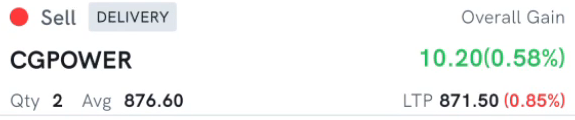
This isn't a UI glitch or a second sale — it's the same sale, just shown as a same-day position because it hasn't settled yet.
Rupeezy doesn't print a minus sign on the quantity, but this is what "negative position" means here: you've sold shares you're not flattening with a same-day buy, so for the day you're conceptually short that quantity, even while the trade is still working its way through settlement.
What happens to the stock on the Holdings tab?
The quantity, invested value and current value for that stock drop to zero on your Holdings tab as soon as the sale executes, well before T+1 settlement. What doesn't happen is the row disappearing: it stays listed, at Qty 0, still showing your original average buy price for reference, and your Holdings count doesn't change either.
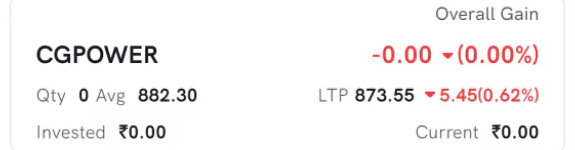
Why does this position's P&L look backwards?
Because it's a Sell position, its Overall Gain is calculated as your sell price minus the current price, the opposite of a normal holding, where gain is the current price minus your buy price. So:
- If the price falls after you sell, this position shows a gain — you sold higher than the stock is trading now.
- If the price rises after you sell, this position shows a loss — you sold lower than it's trading now.
That gain or loss also feeds into your day's overall P&L total, alongside your other open positions, which is what makes the total look like it's moving on a stock you thought you were done with.
If you sold only to lock in a profit or exit for good, and don't plan to buy the shares back the same day, you can ignore this position and its P&L swings; it clears itself out once T+1 settlement completes. See what is settlement, and how does it work? for how the T+1 cycle plays out.
Things to keep in mind
- This applies to selling from Delivery Holdings. If you buy and sell the same stock intraday, it's a regular Intraday position from the start, not this same-day-sale case.
- The Sell position is expected to clear on its own once the trade settles (T+1) — there's nothing you need to square off or cancel.
- The zeroed-out row on Holdings is just a record of the trade for the day; it doesn't need any action from you either.
- If you do want to buy the shares back the same day at a lower price, the Sell position on the Positions tab is what you'd be closing out.