
On Rupeezy, search SGB to find Sovereign Gold Bonds — the same search bar you'd use for any stock. Scroll past the unrelated tickers that also match "SGB" to the ones tagged with the tricolor icon, then tap one to open it.
How do I search for a gold bond?
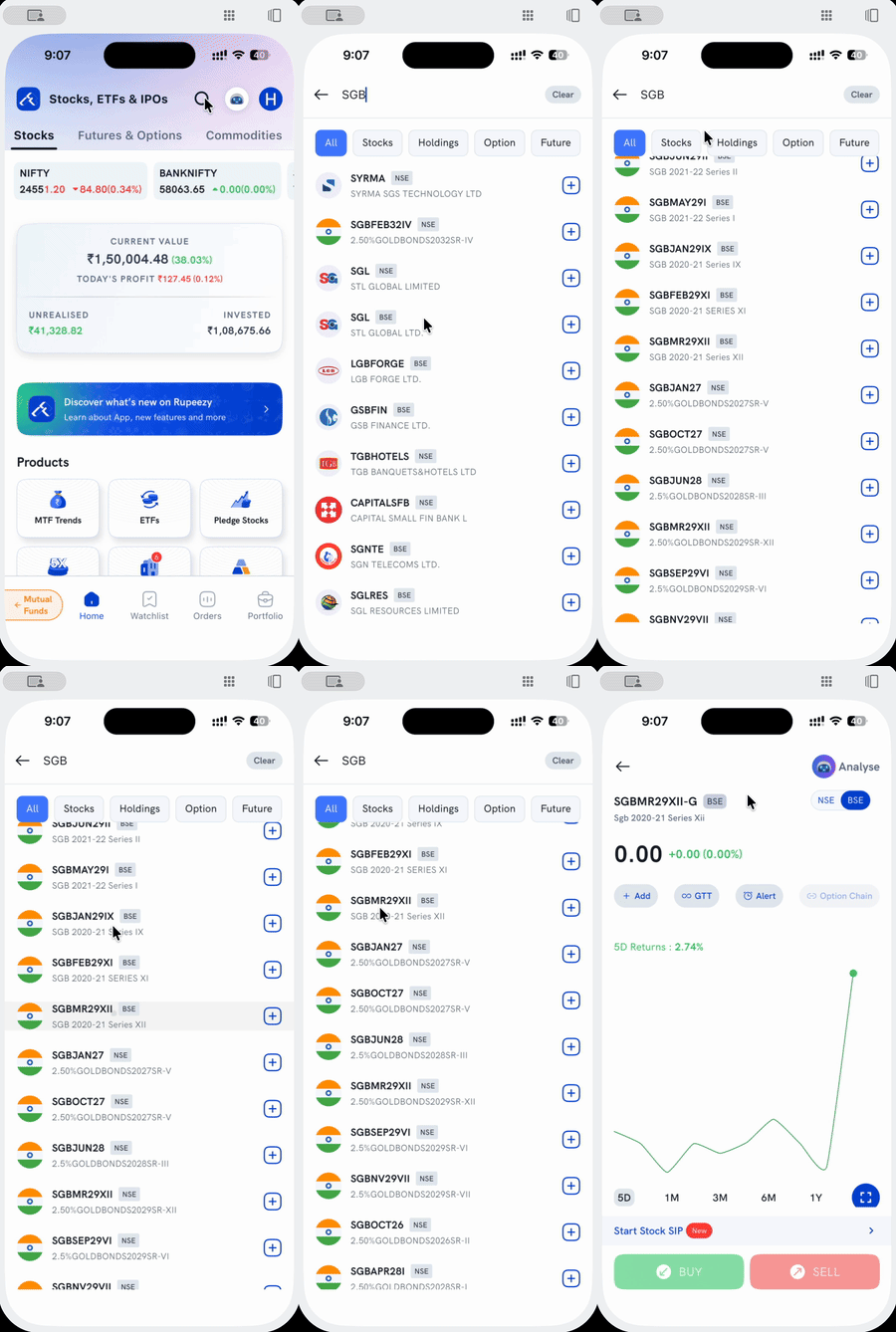
1. Tap the search icon at the top of the Stocks tab (or Watchlist).
2. Type SGB. Results include every ticker containing those three letters, not just gold bonds — so you'll see unrelated stocks like SYRMA, SGL, or LGBFORGE mixed in.
3. Scroll down to the gold bonds. They're tagged with a tricolor flag icon, and named after their series — for example SGBMR29XII (SGB 2020-21 Series XII) or SGBJAN27 (2.50%GOLDBONDS2027SR-V).
4. Tap the series you want. This opens its detail screen, where you can buy or sell it like any listed security.
Why do so many unrelated stocks show up?
Search matches "SGB" as a substring anywhere in the ticker or company name, not just gold bonds specifically — so tickers like SYRMA (Syrma SGS Technology), SGL (STL Global), or GSBFIN (GSB Finance) show up too. The gold bonds are easiest to spot by the tricolor icon rather than the ticker text alone.
Are there multiple gold bond series to choose from?
Yes — many series are listed separately, each with its own ticker, expiry, and price. Check the series name (like SGB 2020-21 Series XII) before adding or buying one, since it's not interchangeable with a different series.
Things to keep in mind
- A gold bond trades like any listed security — buy and sell it from its detail screen the same way you would a stock, not through the participation flow used for G-Secs and T-Bills.
- Searching doesn't place any order — tapping a result only opens its detail screen.