
On Rupeezy, open a stock's buy order screen and tap the MTF product tab — the Required amount drops to what you pay upfront, and Rupeezy funds the rest at up to 5X.
How do I buy a stock using MTF?
1. Search for the stock and open it.
2. Tap BUY on the stock's detail screen.
3. Tap the MTF tab on the order screen, next to Intraday, T+5, and Delivery.
4. Check the quantity, price, and Required amount, then tap BUY.
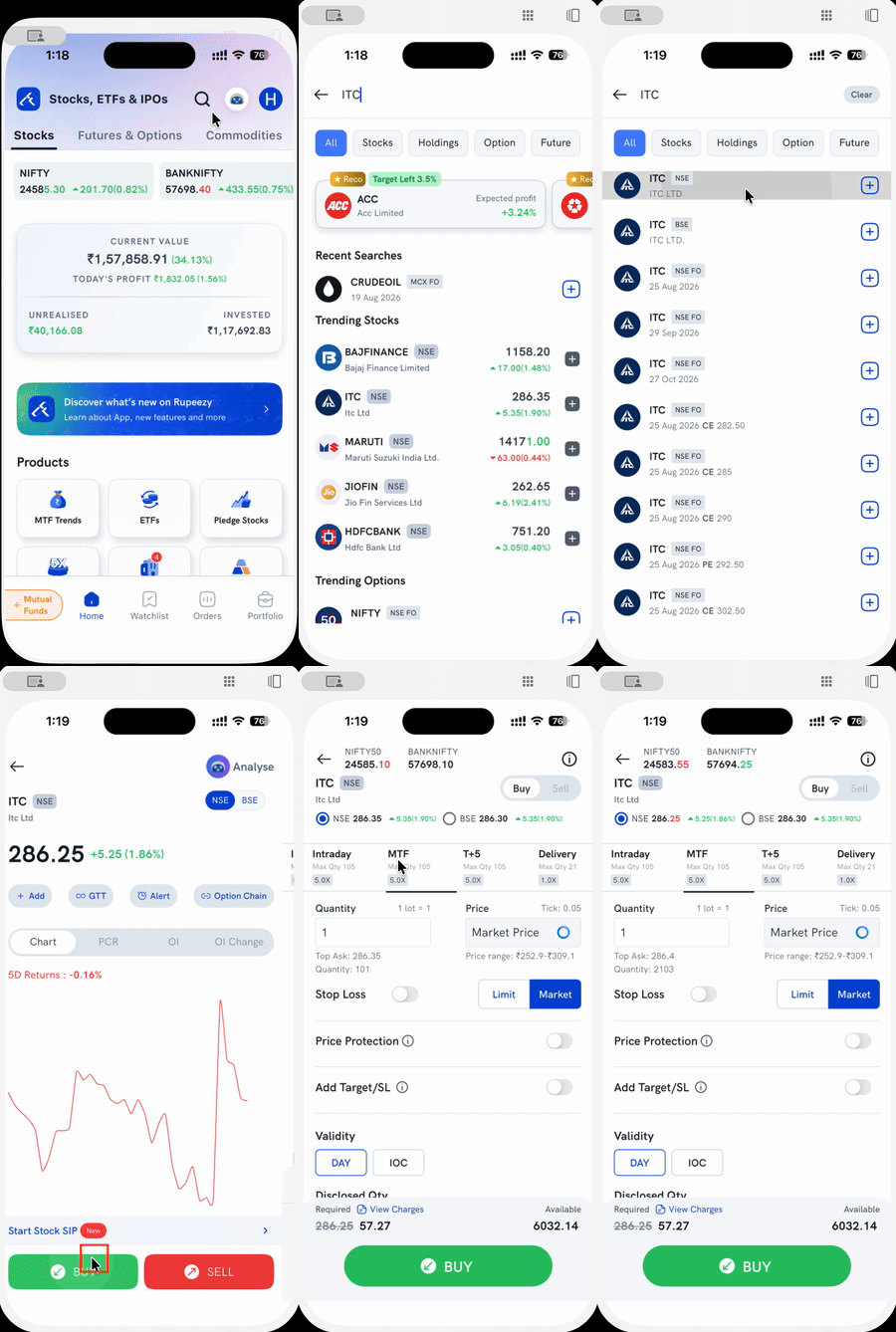
What changes when I switch to the MTF tab?
- Required drops from the full order value to just the margin you fund — for example, from ₹286.25 to ₹57.27 on a ₹286.25 order. See What does the margin required amount on the order window mean? for how Required and Available work across products.
- Max Qty and the leverage badge (e.g. 5.0X) switch to MTF's own limits, separate from Delivery's.
- Validity narrows to DAY and IOC — MTF doesn't offer the AMO (after-market order) option that Delivery does.
Is there another way to fund a Delivery order with MTF?
Yes. On the Delivery tab, a Buy with MTF checkbox appears above the BUY button, showing the same margin amount. Checking it funds that Delivery order through MTF without switching tabs — tapping the MTF tab directly does the same thing and is the more direct route.
Things to keep in mind
- MTF needs to be activated first. If the MTF tab doesn't appear on your order screen, see How to activate Margin Trading Facility (MTF)?
- MTF is available only on exchange-specified stocks — not every stock shows an MTF tab. See Which product should I choose — Intraday, Delivery, MTF or T+5? for how MTF compares with the other products.
- Pledge the shares you buy. Stocks bought under MTF must be pledged, or they may be sold or converted to normal delivery. See What is the process of pledging my shares under MTF?
- Interest is charged daily on the amount Rupeezy funds. See What is Rupeezy's MTF interest? and How does brokerage affect your MTF costs?
- An unmet margin call or sustained losses can trigger a square-off. See When will Rupeezy square off my MTF position?