
You can modify an already-submitted IPO application from IPOs > Applied on the Rupeezy app, any time before bidding closes. An Individual (retail) application can be raised or lowered. An HNI application can only be increased — SEBI doesn't allow HNI bids to be lowered.
How do I modify my IPO application?
- Go to IPOs > Applied.
- Tap the IPO application you want to modify.
- Tap Modify.
- Update the price (clear Cut-off Price to enter a custom bid) and/or the number of lots as required.
- Agree to the IPO terms and conditions, then tap Update.
- Approve the new UPI mandate in your UPI app — see How do I find and accept my IPO mandate on my UPI app?
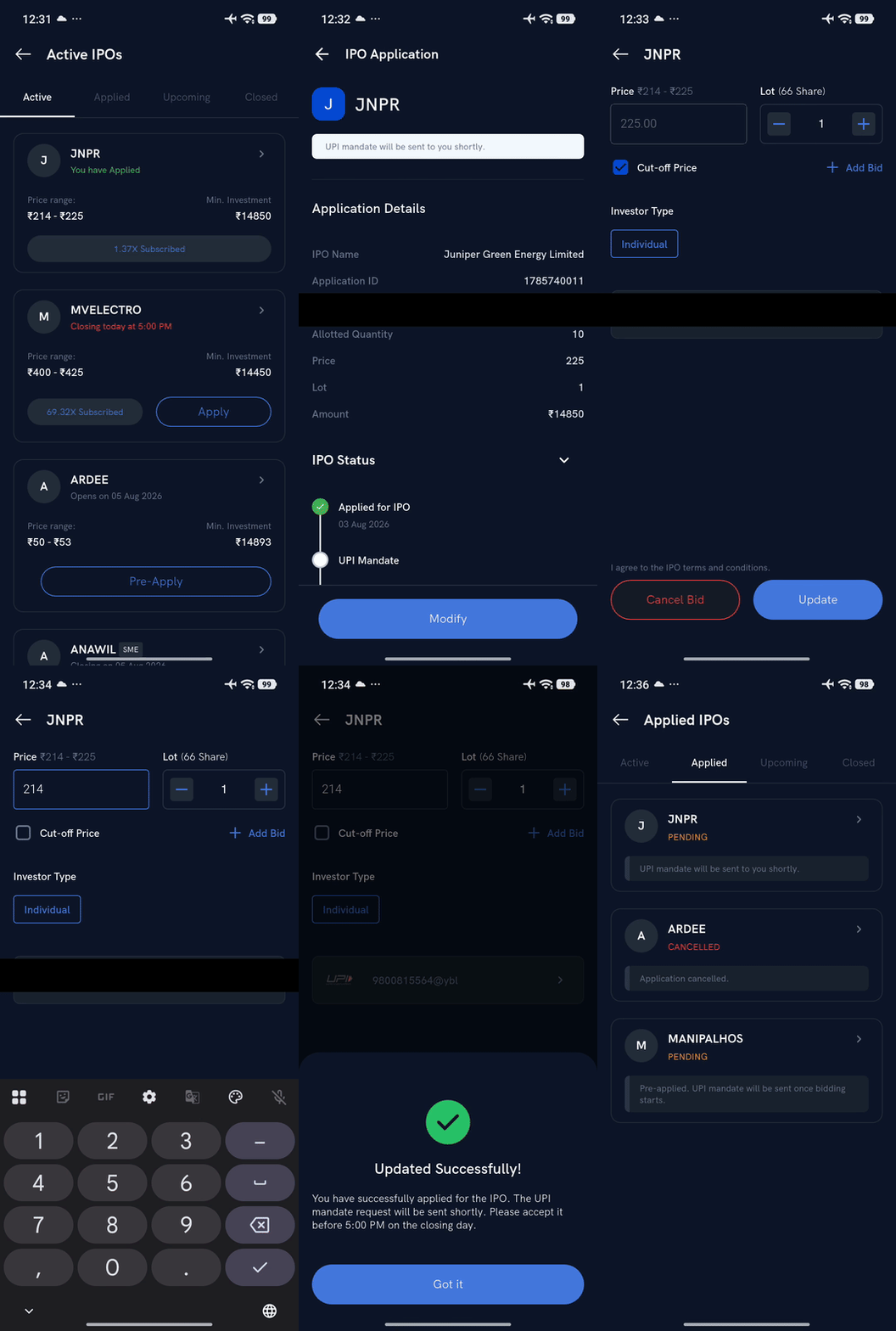
Your modified bid is submitted after mandate approval.
Does modifying my bid change my allotment chances?
No. Allotment is worked out category by category after bidding closes, using only your final bid — when you modified it doesn't matter. If a category is oversubscribed:
- Individual: a lottery gives one minimum lot to as many applicants as possible.
- HNI (NII): each applicant is allotted at least the minimum application size where shares allow; if there aren't enough shares for everyone, a lottery decides who gets it, and any shares left over are allotted proportionately.
- Institutional (QIB): shares are allotted proportionately to bid size.
Things to keep in mind
- You can modify an application only within the IPO bidding window.
- Individual (retail) bids can be lowered, raised or cancelled until the issue closes. HNI (non-institutional) bids can only be increased — they can't be lowered or cancelled at any stage. For HNI applications, see Can I modify my IPO application under the HNI category?
- For the full application flow, see How do I apply for an IPO?