
Search "Bharat Bond" from your Watchlist on Rupeezy, tap + on the result tagged ETF, then Done, the same way you'd add any stock.
How to add Bharat Bond ETF to your Watchlist
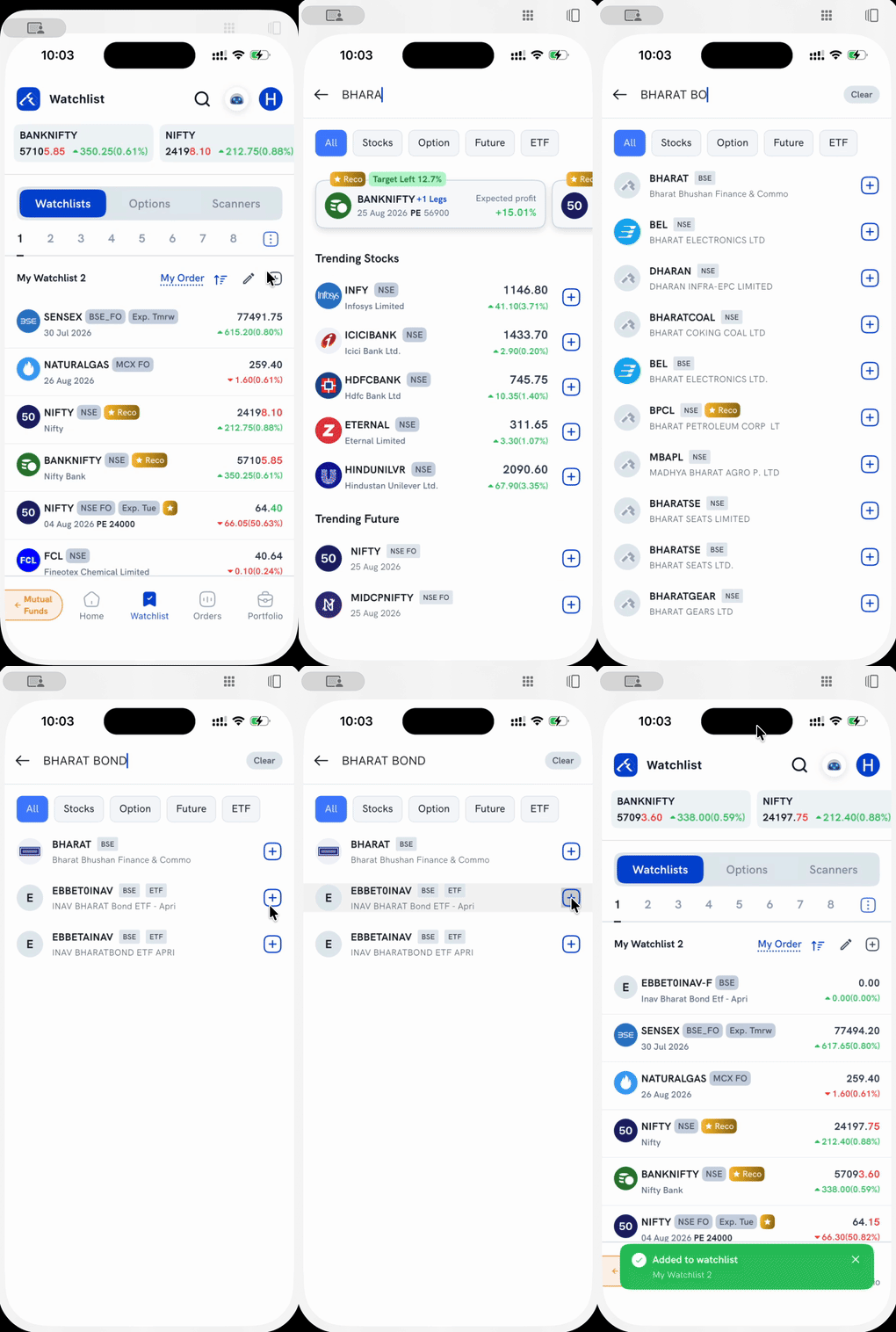
1. Open search. Tap the search icon at the top of the Watchlist screen, or the + next to "My Watchlist." Both open the same search screen.
2. Type "Bharat Bond." The results mix a few different instruments, so check the tag next to each one:
- Rows tagged ETF are the Bharat Bond ETF listings.
- A row simply named BHARAT (Bharat Bhushan Finance & Commodities) is a completely unrelated NSE/BSE stock. Don't tap + on it by mistake just because the name matches the start of your search.
Tap the ETF filter tab above the results to narrow the list to only ETF rows if you want to skip past the unrelated stock entirely.
3. Tap the + next to the ETF result you want. It turns into a checkmark.
4. Tap Done on the bar at the bottom. You're taken back to your Watchlist, a confirmation appears, and the ETF now shows up in your list.
Things to keep in mind
- Adding Bharat Bond ETF to your Watchlist just tracks its price. It doesn't place an order. To trade it, tap the result's row itself (not the +) instead, or open it from your Watchlist once added.
- For the general search-and-add mechanic (any stock, index, or contract), see How do I add instruments to my Watchlist?