
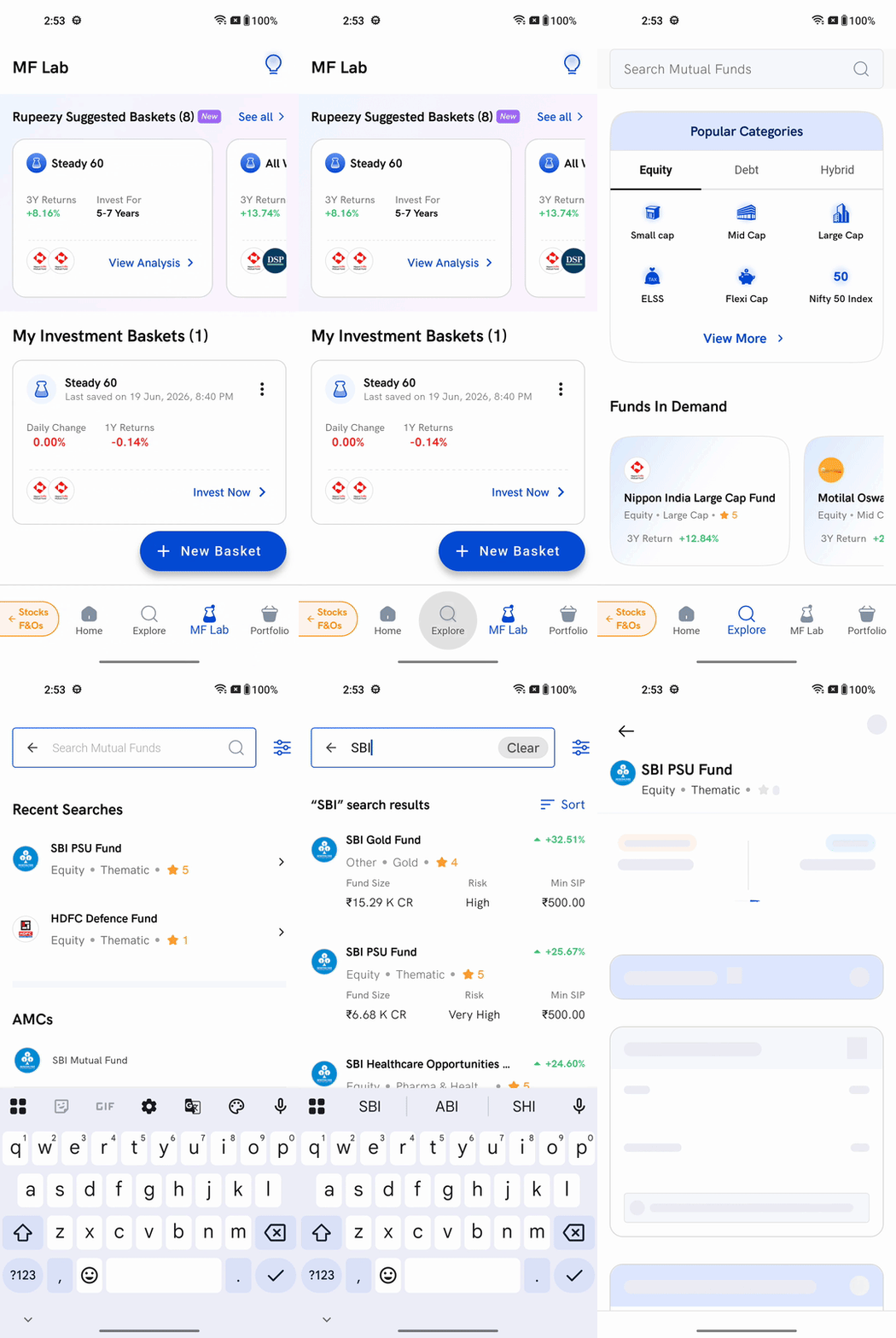
Tap Explore in the bottom bar of the Rupeezy app, tap the Search Mutual Funds bar at the top, and type the name of a fund or a fund house. Results appear as you type — tap any one of them to open that fund's details.
How do I search for a fund?
1. Open the Explore tab — tap Explore in the bottom bar. The Search Mutual Funds bar sits at the top of the screen.
2. Tap the search bar — the search screen opens with the keyboard ready, so you can start typing straight away.
3. Type what you are looking for — a scheme name ("SBI PSU Fund") or just a fund house name ("SBI") both work. You do not need the full name; results narrow as you type.
4. Tap a result — the header shows "SBI" search results, and each result is a card. Tapping one opens that fund's details page, where you can see its performance chart and invest.
There is also a search icon on the mutual funds home screen, at the top right. It opens the same search screen.
What does each search result show?
Every result card carries the details you need to shortlist a fund without opening it:
- Fund name and its category — for example Equity • Thematic
- 3-year return, shown against the fund name
- Rupeezy rating — the star rating beside the category
- Fund Size — the scheme's assets under management
- Risk — the riskometer level, such as Very High
- Min SIP — the smallest SIP instalment that fund accepts
Can I sort the search results?
Yes. Tap the Sort control on the right of the results header and pick one of three options:
- Returns (3YR)
- Risk (3YR)
- Expense Ratio
Can I narrow the results down further?
Tap the filter icon to the right of the search bar. You can filter by fund category, fund house (AMC), risk level, fund size, minimum investment, investment type, and Rupeezy rating.
If a combination of filters leaves nothing to show, the screen reads No Match Found. Tap Reset Filters to clear the filters and start again.
What is on the search screen before I type?
Two things help you get started without typing a name:
- Recent Searches — the last 5 funds you opened from search, so you can jump back to a fund you were comparing. This section appears only once you have opened a fund from search at least once.
- AMCs — a list of fund houses. Tap one to see the schemes that fund house offers.
Things to keep in mind
- Searching does not place any order. Tapping a result only opens the fund's details page.
- A fund's details page may show a note from the fund house, such as one-time investment being unavailable for that scheme. That is set by the fund house, not by Rupeezy, and it varies from fund to fund.
- Returns shown in search results are past performance and are not a promise of future returns.