
You can change the product type of an open position — from Intraday to Delivery or from Delivery to Intraday — without closing it. The steps are the same in both directions.
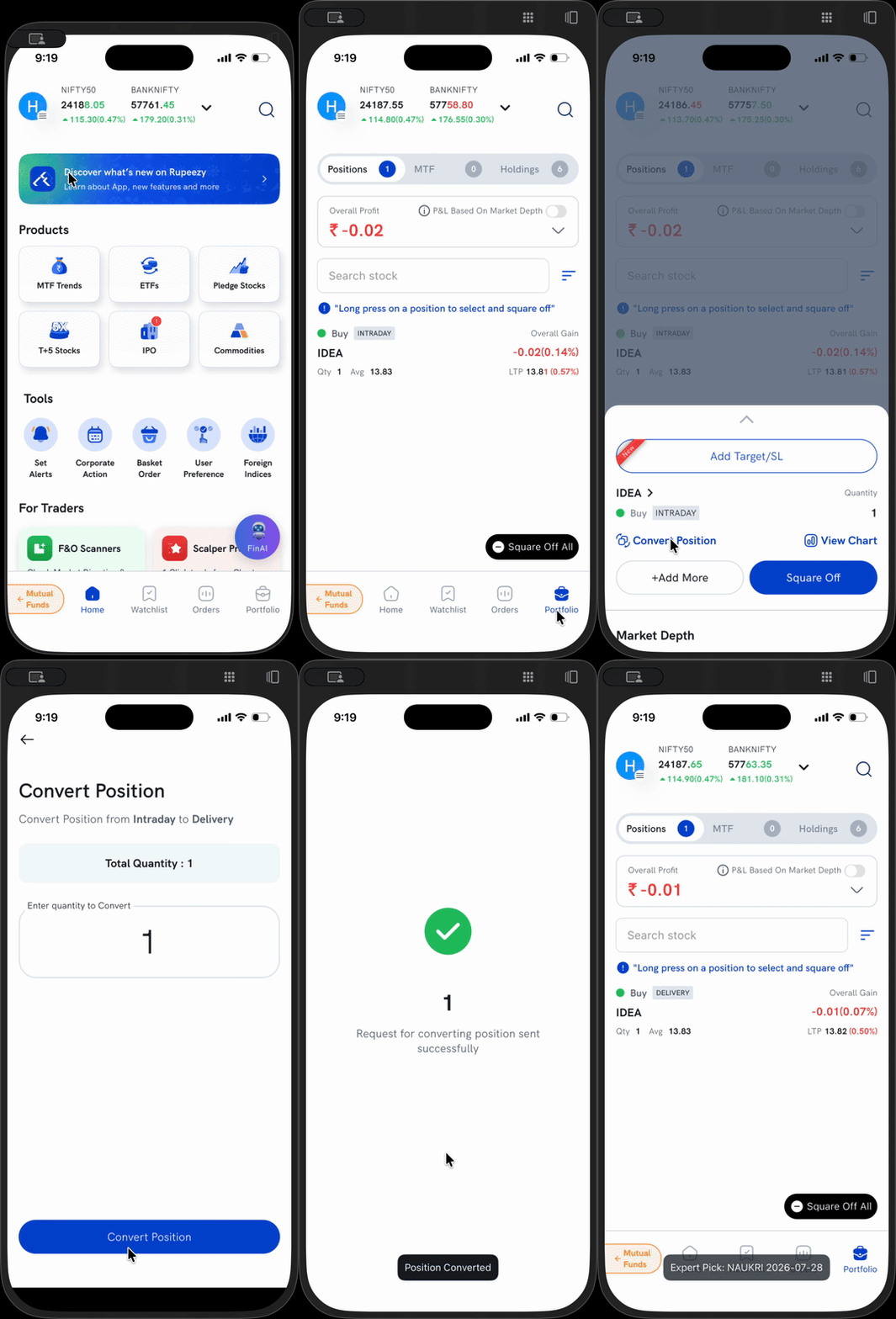
Convert a position
- Go to Portfolio → Positions.
- Tap the position you want to convert.
- In the options that appear, tap Convert Position.
- On the Convert Position screen, check the direction shown at the top (for example, "Convert Position from Intraday to Delivery") and enter the quantity to convert.
- Tap Convert Position.
You'll see "Request for converting position sent successfully" once it's done. You can convert the full quantity or just a part of it.
Good to know
- Intraday → Delivery moves the position out of same-day auto square-off so you can hold it — make sure you have the full delivery margin for the quantity you convert.
- Delivery → Intraday is only for a position taken the same day; a holding from a previous day can't be converted.
- Conversion isn't allowed in some cases — for example, T+5 positions, sold equity positions, or certain restricted scrips. If you see a message saying conversion isn't allowed, that position isn't eligible.