
Your SIP auto-debit mandate is called AutoPay in the Rupeezy app. To check its status, go to Account → Autopay from the home screen: each AutoPay shows its Status (for example, Active), and tapping it opens the full details — AutoPay ID, reference number (UMRN), daily limit, and the SIPs linked to it.
How to check your AutoPay status on the Rupeezy app
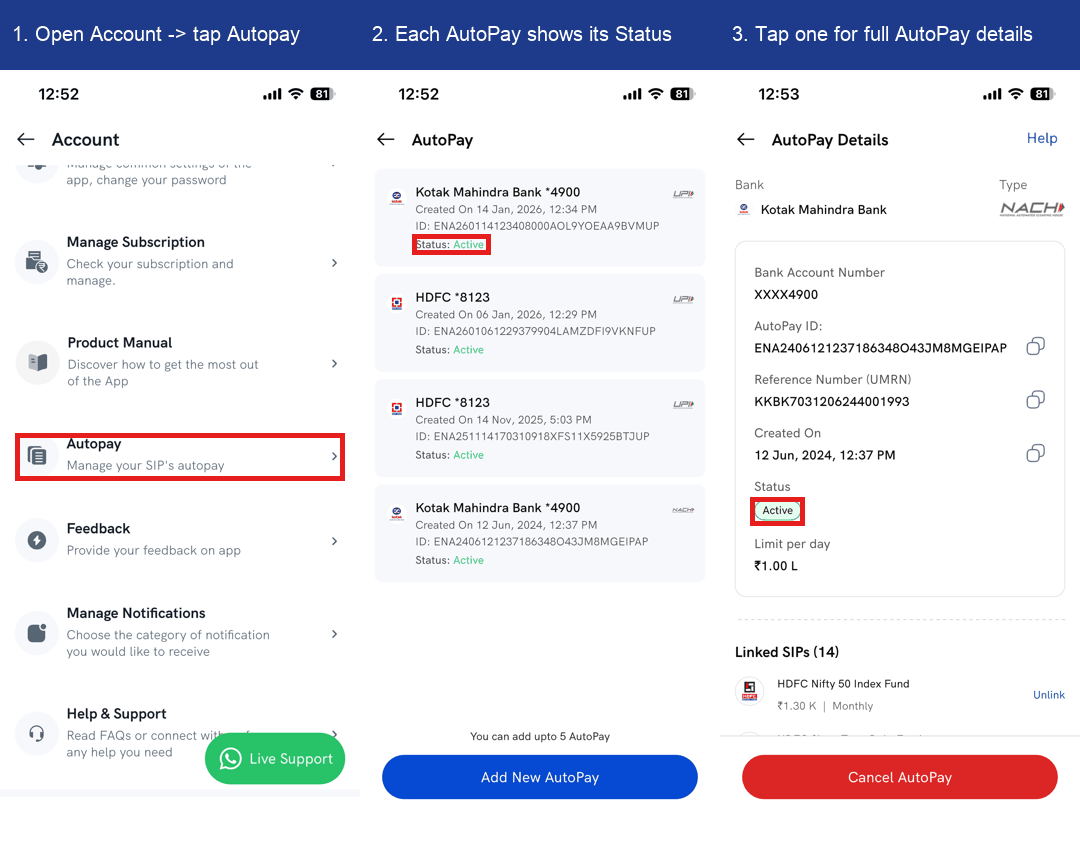
1. On the home screen, tap Account.
2. Tap Autopay — the "Manage your SIP's autopay" option.
3. Check the Status on the AutoPay list. Every AutoPay shows its bank and masked account, the created date, its AutoPay ID, the type (UPI or NACH), and its Status (for example, Active).
4. Tap an AutoPay for full details. The AutoPay Details screen shows the Status, AutoPay ID, Reference Number (UMRN), daily limit, and the Linked SIPs using that AutoPay.
What do the AutoPay statuses mean?
Each AutoPay shows one of these statuses:
- Active (green) — the AutoPay is approved and working; the SIPs linked to it will be auto-debited on schedule.
- Pending (orange) — the AutoPay is created but not yet approved by your bank; approval can take a few working days.
- Rejected (red) — your bank or UPI app did not approve the AutoPay; set it up again to continue those SIPs.
- Cancellation Processing (orange) — you've requested to cancel this AutoPay and it's being processed.
How many AutoPays can I set up?
You can have up to 5 AutoPays on Rupeezy. Add one with Add New AutoPay, or open an AutoPay's details to Cancel AutoPay.