
You can check the status of a regular payout on Rupeezy from the Withdraw screen, opened from the Funds section of your Account. Every withdrawal you have placed appears under Withdraw Request with a status badge, and tapping a request opens its Transaction Details with the status, transaction ID, and estimated credit time.
How do I check my payout status on the Rupeezy app?
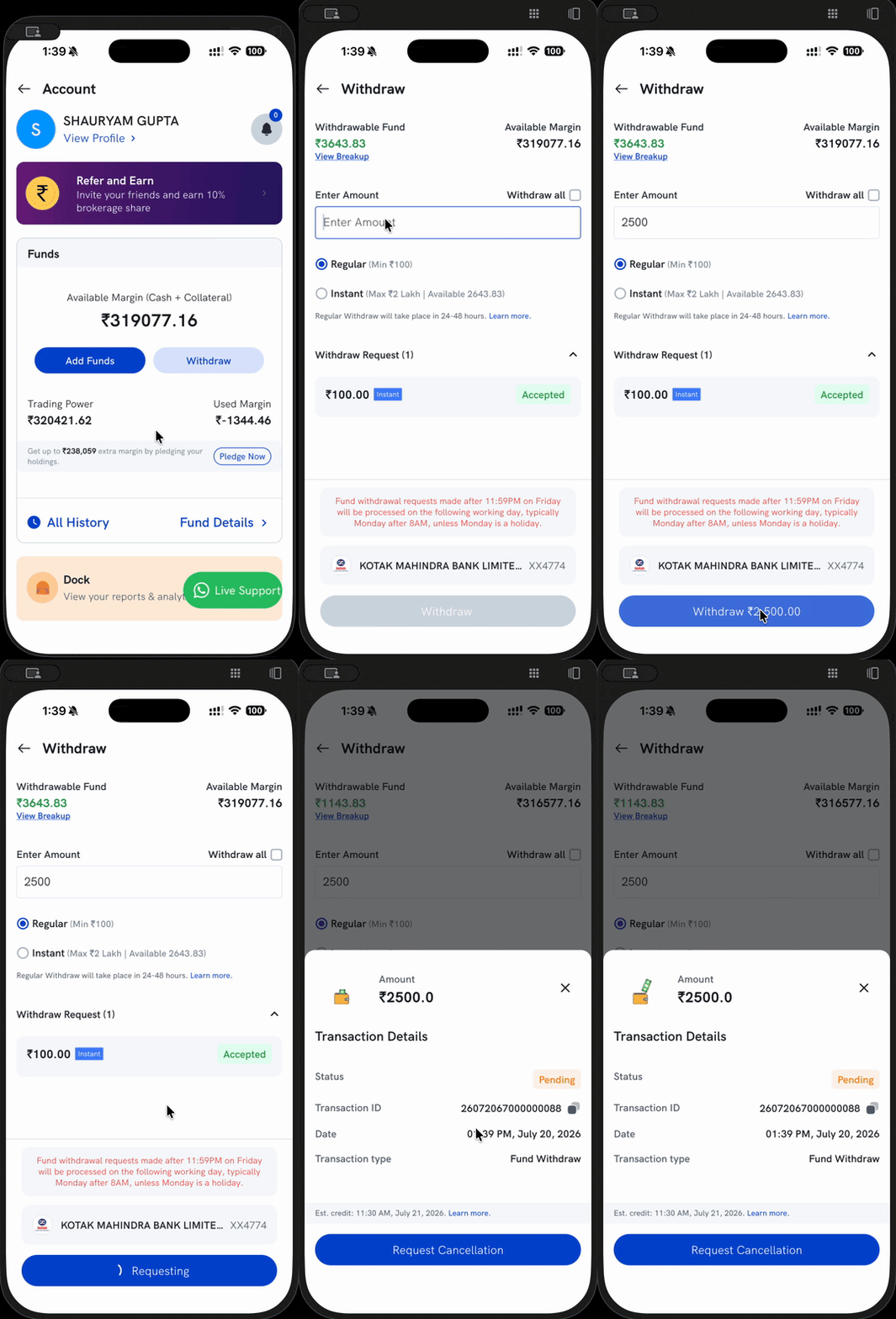
- Open the Withdraw screen — go to your Account, and under Funds tap Withdraw.
- Find your request — scroll to Withdraw Request. Each payout is listed with its amount, whether it was a Regular or Instant withdrawal, and a status badge.
- Open Transaction Details — tap a request to see its Status, Transaction ID, the date it was placed, and the estimated credit time.
What do the payout statuses mean?
- Pending — we have received your request and it is queued for processing. The Transaction Details sheet shows an estimated credit time (for example, Est. credit: 11:30 AM, July 21, 2026).
- Accepted — your request has been taken up for processing and the funds are on their way to your registered bank account. The actual credit time depends on your bank.
A regular payout that is still Pending can be cancelled from its Transaction Details sheet using Request Cancellation, as long as it has not yet been processed.
Why does my payout still show as pending?
A regular payout is not instant. The Withdraw screen notes that a Regular withdrawal takes place in 24–48 hours, and requests made after the daily cut-off — or on a weekend or public holiday — are processed on the next working day. Until then, the request stays Pending and shows its estimated credit time. For the full cut-off table, see How much time does it take to process a withdrawal request?.
Important: If a payout is credited for a lower amount than you requested, the end-of-day process likely reduced your withdrawable balance after debiting charges and the day's net obligation. See Why have I received a lower amount of payout than what I requested?.
Things to keep in mind
- A regular payout is credited within 24–48 hours. If you need funds the same day, use Instant Withdrawal (available 9:00 AM–4:00 PM, up to ₹2 Lakhs, once a day).
- You can cross-check any credited or debited payout in your ledger under Dock. See Where can I download my ledger report?.
- If a payout shows as accepted but the money has not reached your bank within the estimated time, check with your bank first before raising a request with us.