
An NFO (New Fund Offer) is the first subscription window for a brand-new mutual fund scheme — the period when you can invest in it before it opens for regular buying and selling. On Rupeezy, you can browse live NFOs and apply for one in a few taps from the Invest home screen.
What is an NFO?
NFO stands for New Fund Offer. When an AMC (the fund house) launches a brand-new scheme, it opens for subscription for a limited period — this is the NFO. Investing during this window means you are among the first to subscribe to the scheme. The AMC pools the money collected during the NFO and uses it to build the fund's initial portfolio.
Once the NFO period closes, units are allotted to investors and the scheme opens for regular transactions. Some schemes — such as close-ended schemes — accept subscriptions only during the NFO window.
Things to know before you apply
- An NFO is open only for a limited period. Each NFO has a closing date, after which you can no longer subscribe. On Rupeezy you'll find current offers under the Live tab and past ones under Recently Closed.
- Units are allotted after the NFO closes. Once the fund house processes the allotment, your units appear in your portfolio.
- You can apply through a One-Time (lumpsum) investment or a SIP, depending on what the fund allows.
- Every mutual fund you invest in on Rupeezy — an NFO included — is a direct plan.
How to apply for an NFO on the Rupeezy app
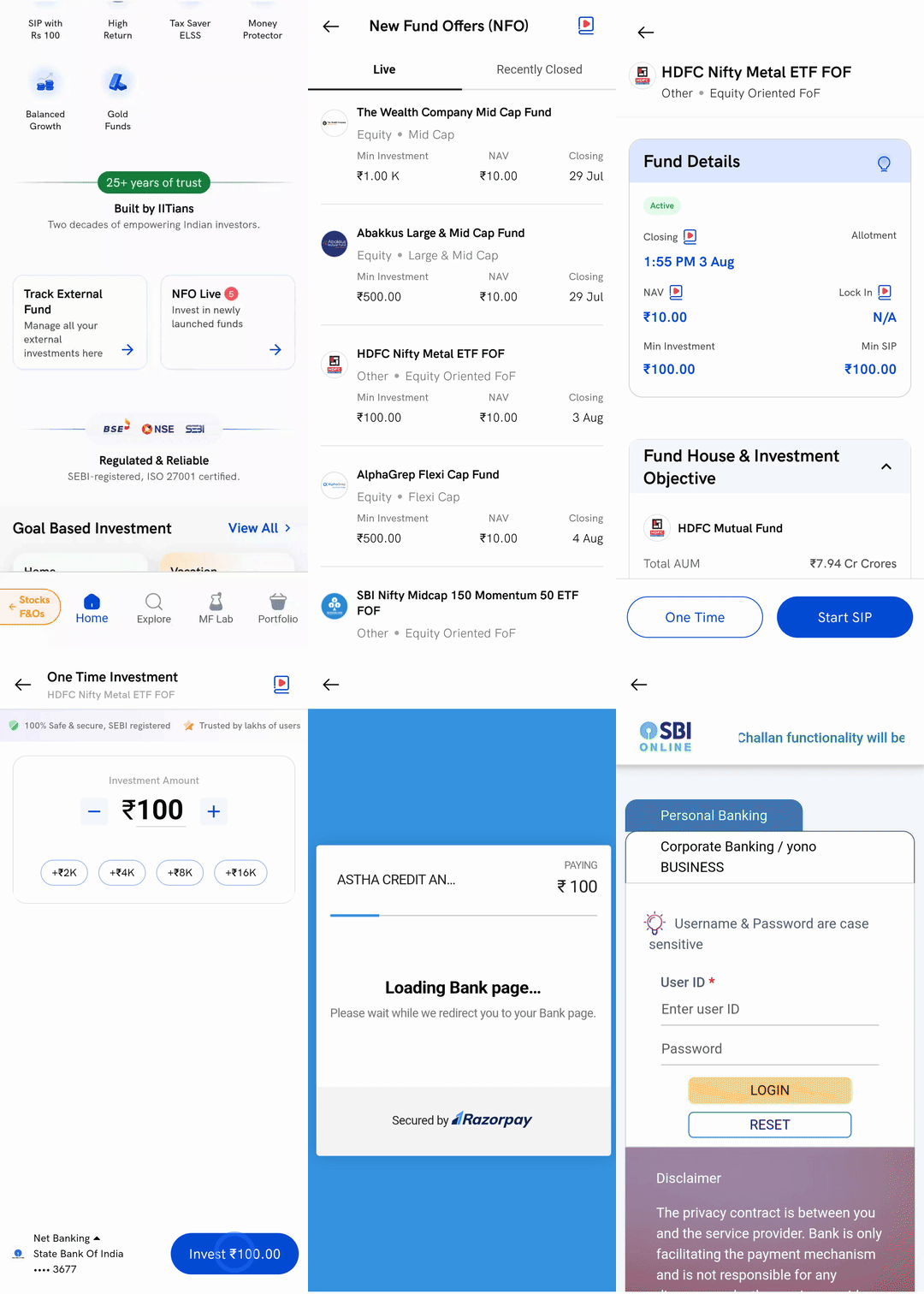
- On the Invest home screen, tap the NFO Live card ("Invest in newly launched funds").
- Under New Fund Offers (NFO), stay on the Live tab and tap the fund you want to invest in.
- Review the fund's details — its closing date, NAV, lock-in (if any) and minimum investment — then tap One Time for a lumpsum, or Start SIP to invest through a SIP.
- Enter the amount you want to invest and tap Invest.
- Choose your payment method and complete the payment through your bank. Your units are allotted once the NFO closes.
For a step-by-step walkthrough of a lumpsum order, see How to place a lumpsum order on Rupeezy?.