
A lumpsum order is a one-time mutual fund purchase — you invest the full amount in a single payment, instead of spreading it across periodic SIP instalments. You can place one from any fund's page on the Rupeezy app.
How to place a lumpsum order on the Rupeezy app
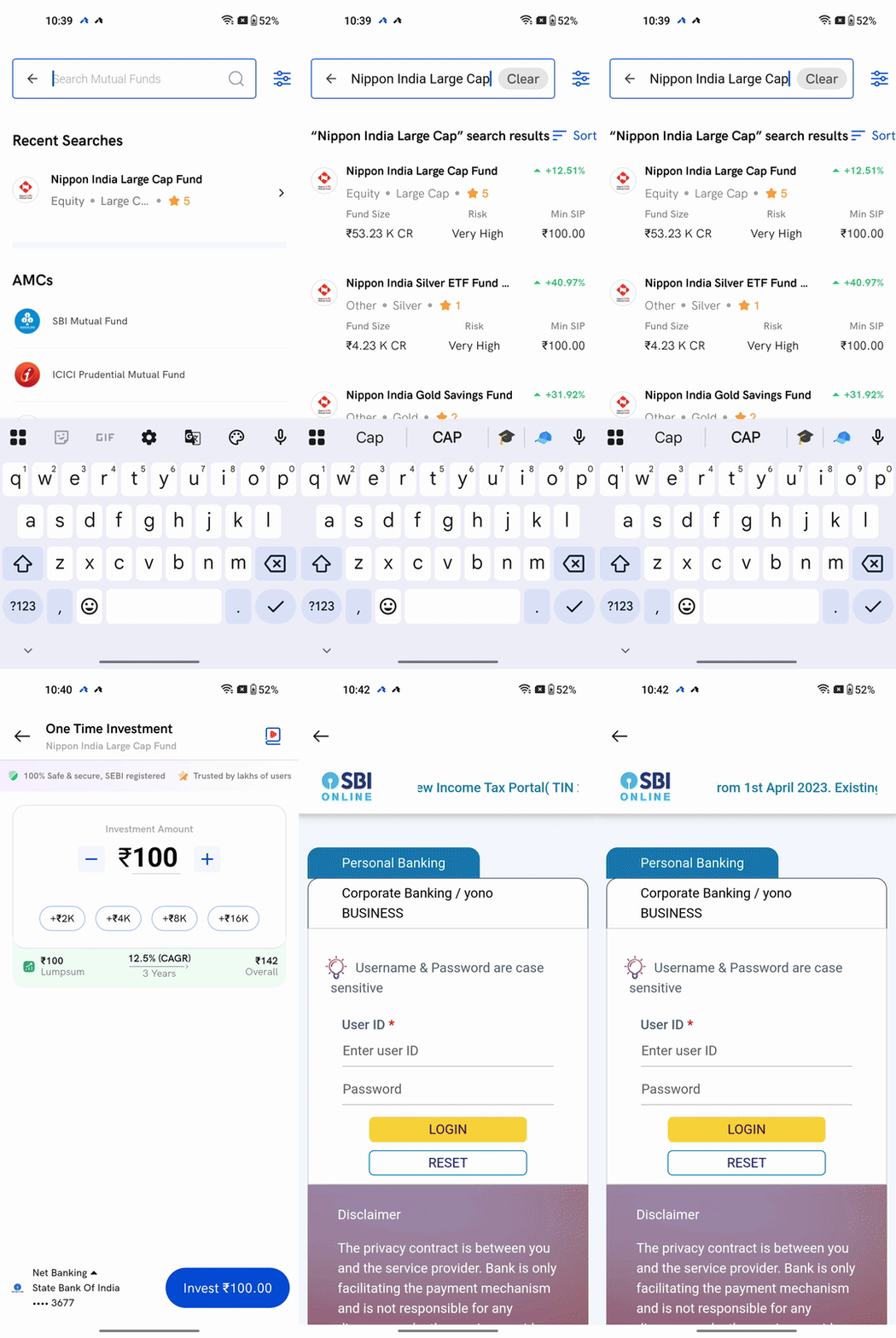
1. Search for the fund — tap Explore, then search for the mutual fund you want to invest in.
2. Open the fund page — tap the fund from the search results to see its NAV, returns and fund details.
3. Tap One Time — the fund page shows two purchase options, One Time and Start SIP. Tap One Time for a lumpsum order.
4. Enter the amount — the amount field opens at the fund's minimum investment; use +/− or type to change it.
5. Tap Invest — review the amount shown, then tap the Invest button (it shows the amount, e.g. Invest ₹100.00).
6. Complete the payment — choose UPI, net banking, or NEFT to pay for the order.
When does a lumpsum order reflect in my folio?
It takes about 2–3 days after your payment is confirmed for the units to reflect in your folio. The NAV you get depends on when your payment is confirmed against the fund's cut-off timing.
Things to keep in mind
- The minimum lumpsum amount is set by the fund, not by Rupeezy — check the Min SIP / minimum investment shown on the fund's page before you start.
- Payment for a lumpsum order only goes through UPI, net banking, or NEFT — there's no card payment option.