
Introducing, Fast API Trading Platform - Vortex. Simple, swift, easy to implement Trading APIs. Trade as you like, connect to app or build your own platform with our superfast APIs.
Building a customised trading platform is a plug & play with Vortex APIs.
Explore our APIs
-
Order Management API: Place, modify and execute orders, all exchanges and all order types.
-
Portfolio API: Retrieve list of open positions across segments. Access holdings in your demat account.
-
Funds API: Get information of your trading account e.g. balance, margin utilised, collateral etc.
-
MarketFeed API: Get live market data of all exchanges without delay and interruptions.
-
Historical Data API: Get past data for Open, High, Low and Close price with Volume and OI.
-
Basket Order API: Create strategies and execute multiple orders together, with margin benefits adjusted for a pool of scrips.
How do I register for Vortex APIs?
- Don't have a Rupeezy account yet? Open one here: https://accounts.rupeezy.in/authentication/login
There is no separate sign-up for Vortex. You log in with the same credentials you use for your Rupeezy account.
-
Go to the Rupeezy Vortex Platform.
-
Click Login Using Rupeezy Credentials and complete the login.
After you log in, you're ready to create your API key.
How do I generate a Vortex API key?
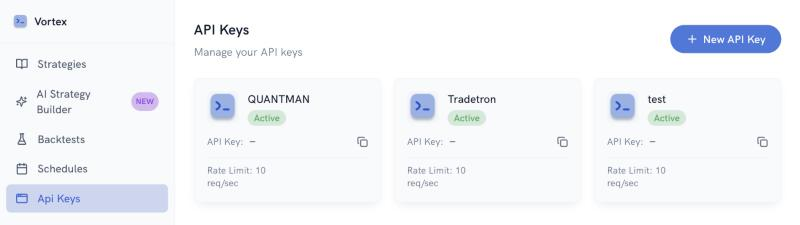
- Open API Keys from the left menu. This page lists all the API keys you have created.
-
Click + New API Key.
-
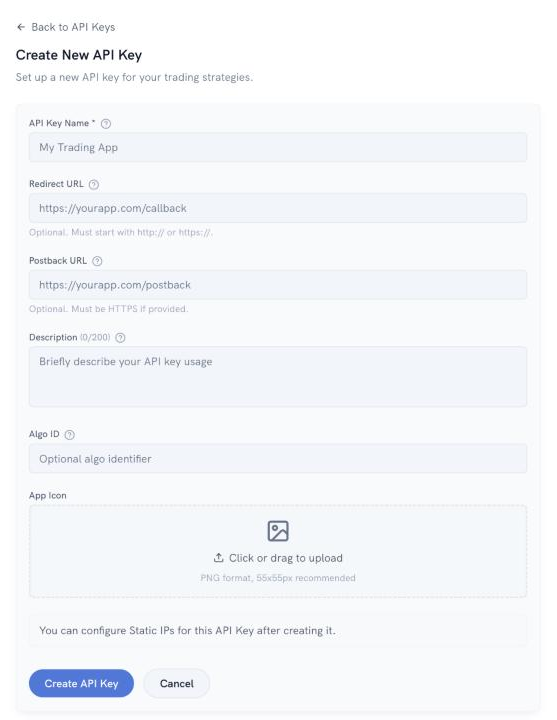
Fill in the details and click Create API Key.
- API Key Name (required): a name to identify this key, for example "My Trading Bot".
- Redirect URL (optional): the URL users are sent to after they log in through your app (used for the login flow). It must start with http:// or https://. You can use http://127.0.0.1 for testing.
- Postback URL (optional): the URL where Rupeezy sends real-time order updates. It must be an HTTPS URL.
- Description (optional): a short note, up to 200 characters, to remind you what this key is used for.
- Algo ID (optional): your algo identifier registered with the exchange. You need this only if you send more than 10 orders per second. See How does the Algo ID work in API trading?
- App Icon (optional): a PNG image, 55×55 px recommended.
-
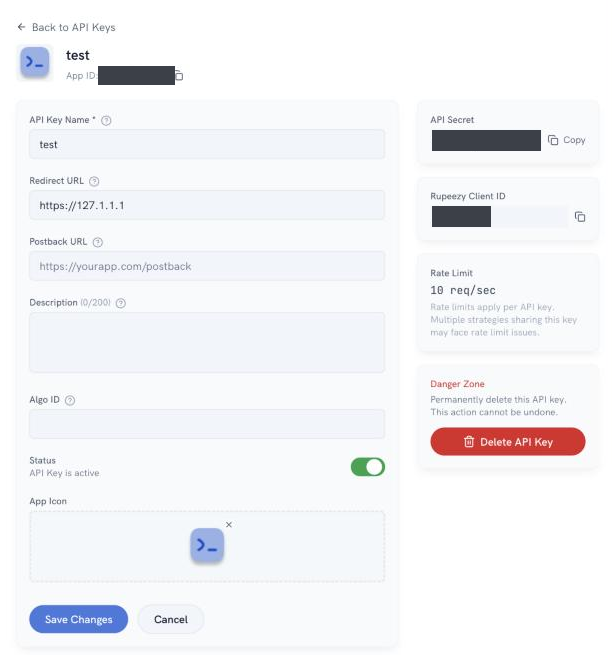
Your new key now appears on the API Keys page. Click it to open its details, where you'll find:
- App ID, shown under the key name
- API Secret: click Copy to copy it. You can come back and copy it again any time.
- Rupeezy Client ID: the Rupeezy account this key is linked to
- Rate Limit: 10 requests per second for each API key
You can also edit the key's details, turn it on or off using the Status toggle, or delete it permanently with Delete API Key.
Use the App ID and API Secret to connect your platform to Vortex. Your API keys don't expire.
By default, an API key works with a single Rupeezy client ID. If you need multi-user login support, email us at support@rupeezy.in or raise a support ticket.
How do I add a static IP to my API key?
You must map a static IP to your API key before you can place orders through the API.
-
Open the API key from the API Keys page.
-
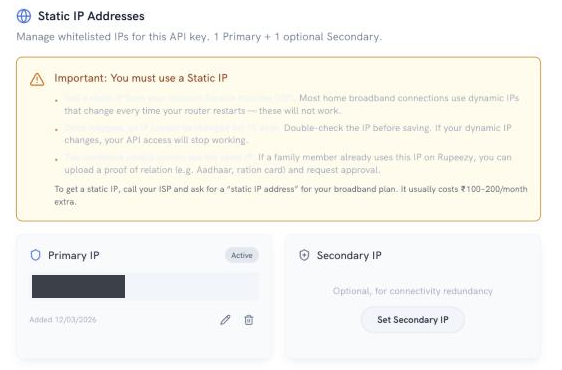
Scroll down to Static IP Addresses.
-
Add your Primary IP. You can also add an optional Secondary IP as a backup connection.
Keep these points in mind:
- Use a static IP from your Internet Service Provider (ISP). Most home broadband connections have a dynamic IP that changes when your router restarts, and these won't work.
- Once mapped, an IP can't be changed for 15 days, so double-check it before saving.
- Two unrelated people can't use the same IP. If a family member already uses this IP on Rupeezy, you can upload a proof of relation (for example, Aadhaar or a ration card) and request approval.
For more details, see How does Static IP work in API trading?
Integrate your Platform:
-
Read our API documentation
-
SDKs: Python, Node.js and Go. See the SDK documentation
FAQs
How do I get access to the API?
Register on Rupeezy API platform - Vortex and access the keys to start API trading
What are Trading APIs?
An Application Programming Interface (API) is a software interface that allows two applications to connect without the involvement of a user. A trading API allows you to connect to Rupeezy’s trading system directly, personalise your trading interface as per your needs. It enables you to innovate your trading strategies, get real time data and place precise trades.
What are the charges for API?
Order execution and monitoring API are Free for clients.
How to get started with Rupeezy API?
To get started with Rupeezy API, follow the below steps:
-
Log in to the Rupeezy Vortex Platform with your Rupeezy credentials
-
Generate your API key from the API Keys page and map your static IP
-
Integrate your platform
-
Start Trading
Why choose Rupeezy APIs?
-
Easy Integration: Easy integration with choice of your programming languages. No more C++ Java limitations, we use Python SDKs. Spend your time to integrate not create.
-
1.5k happy customers: Open up your trading and investing platform to over 1.5+ clients of Rupeezy
-
No Infrastructure Fee: Get order execution and monitoring APIs for free.
-
Professional Support: Dedicated support to help you get started.