
Profit and Loss statement is available on your ‘ Dock’ backoffice application to view and download.
-
Go to ‘Reports’ tab.
-
Click on ‘Profit & Loss’
-
Go to ‘Segment’ from the dropdown menu.
-
Select the Date Range and click on ‘Submit’
-
Download the report from ‘Download Summary’ tab on bottom right corner.
Now you can view the Report in csv format.
Downloading your ELSS statement
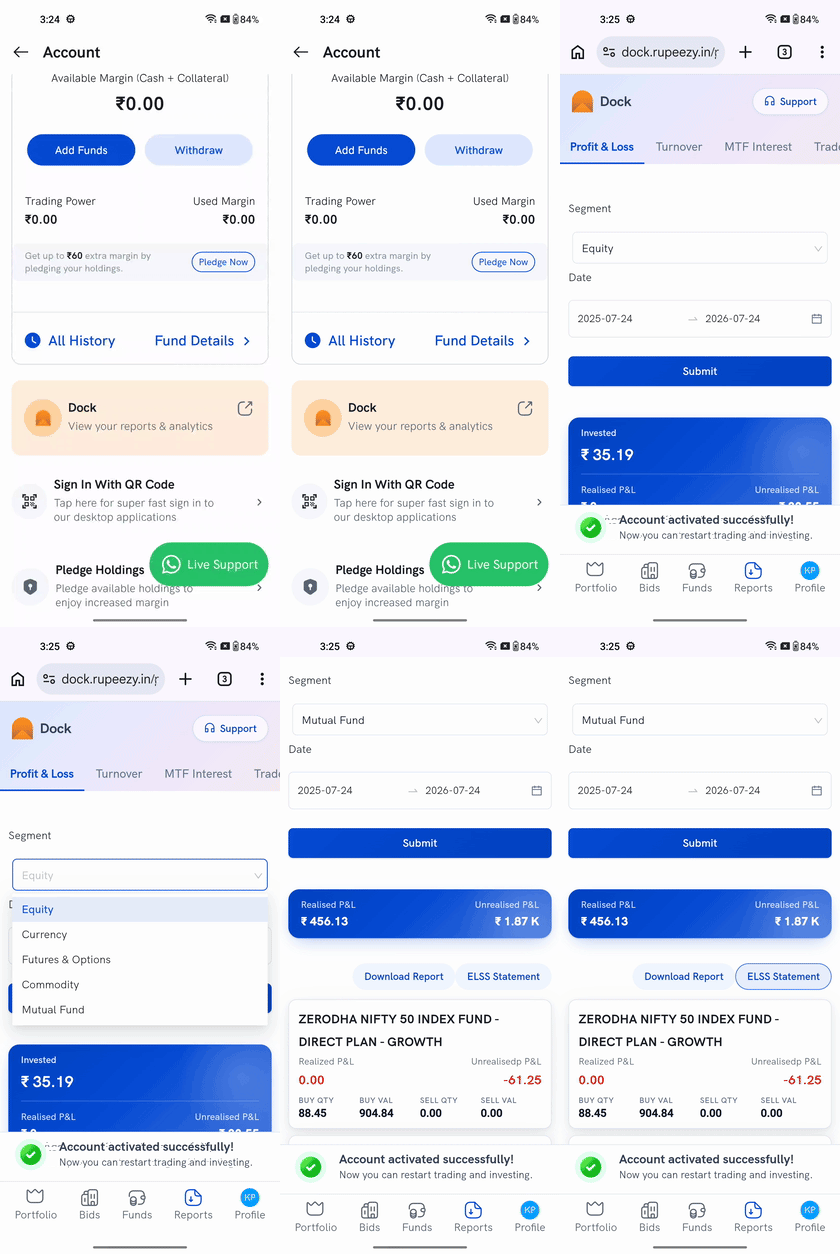
On the Mutual Fund segment, a second button sits next to Download Report — ELSS Statement. Tap it to download a separate statement of just your ELSS investments, without pulling the full P&L report. ELSS Statement only appears on the Mutual Fund segment — other segments show just Download Report.
ELSS (Equity Linked Savings Scheme) is the tax-saving mutual fund category eligible under Section 80C — see What are ELSS Plans? for how it works.